

TREATLIFE Single Pole Smart Light Switch, Neutral Wire Required, 2.4GHz Wi-Fi Light Switch, Works with Alexa and Google Home, Schedule, Remote Control
$17.50
Related Products




From the brand

Swipe to learn more

Why TREATLIFE
Our goal is to make little changes through technology in people’s lives and make them easier and happier.
From smart lights, dimmer switches, plugs, and smart home sensors to any products that may follow, we will allow you to interact directly with your home easily and naturally, just as simple as tapping a switch.
New Release

Smart Dimmer Switch
Smart Home

3 Way Smart Switch
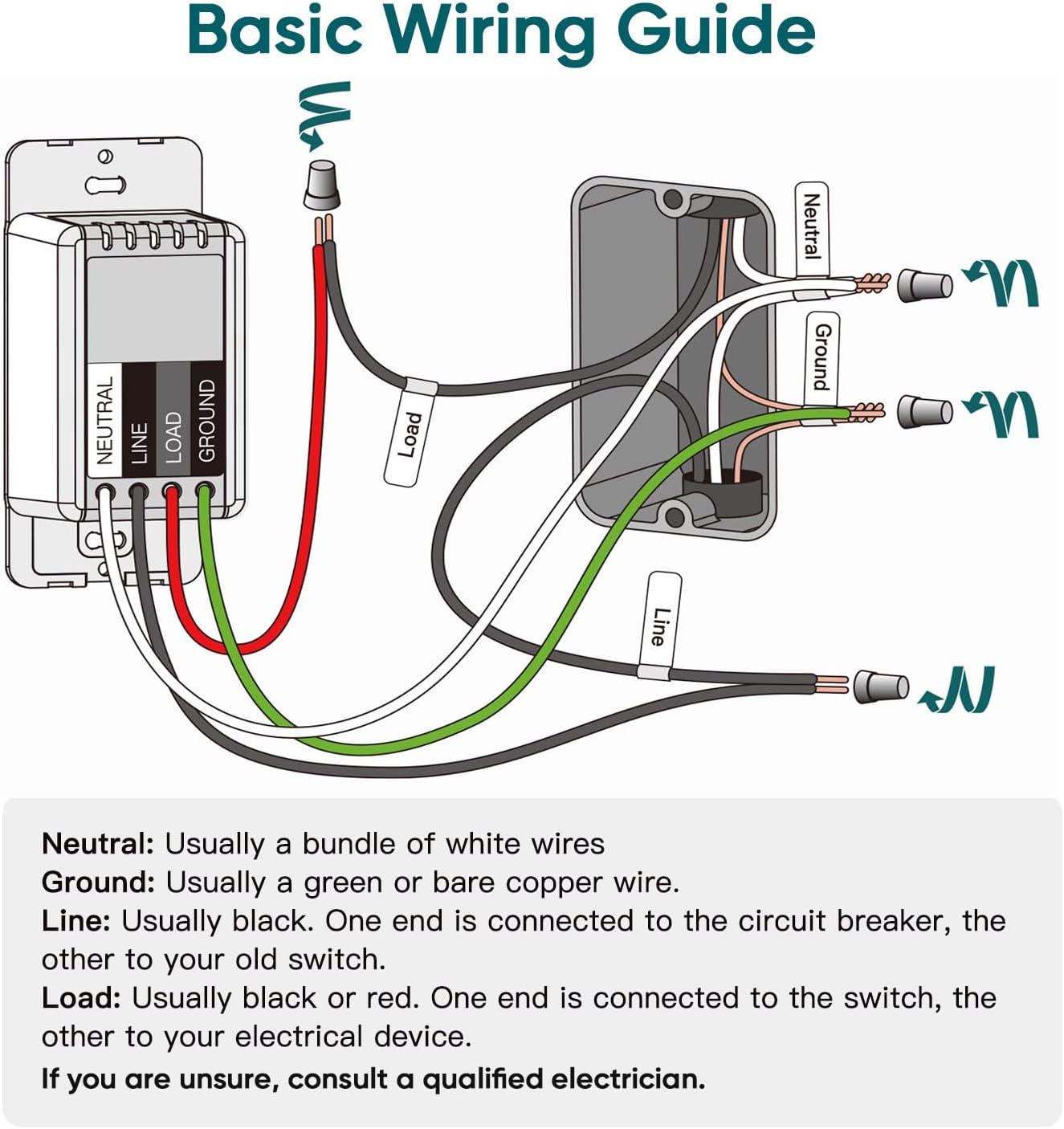
Note Before Purchase: This smart switch requires a neutral wire and only connects to 2.4GHz WiFi networks (5GHz is not supported). It is designed for single-pole applications only and cannot be used in 3-way wiring setups. This model is an on/off switch and does not provide dimming capability. Each switch comes with a standard-size, screwless snap-on wall plate. Electrical rating: 1250W, 10A
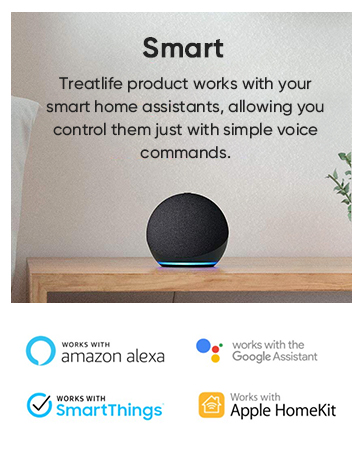
Voice-Activated Lighting: No hub required. Experience the ultimate convenience of controlling your home lights with just your voice. Our wifi switches for lights seamlessly integrate with Amazon Alexa, Google Assistant, and SmartThings, perfect for when your hands are full or entering a dark room
Illumination at Your Fingertips: Take full control of your lights from anywhere using the Smart Life app on your smartphone. Whether you’re cozy in bed, busy at the office, or enjoying a well-deserved vacation, easily turn your lights on/off, create personalized schedules, monitor real-time light status, share device access, and effortlessly manage groups of lights with a simple tap
Effortless Lighting Automation: Automated schedules offer peace of mind and energy savings. Set timers or countdowns to automatically turn your lights on/off based on your daily routines or create the illusion of occupancy while you’re away, ensuring a well-lit home to deter potential intruders
Smart Home Automation: Take control of your lighting at any moment and bid farewell to life’s trivialities. Our Alexa light switch brings the convenience of a smart home within reach. Rest assured, our dedicated support team is ready to promptly assist you and ensure your satisfaction in case of any unexpected quality issues
11 reviews for TREATLIFE Single Pole Smart Light Switch, Neutral Wire Required, 2.4GHz Wi-Fi Light Switch, Works with Alexa and Google Home, Schedule, Remote Control
Add a review

$17.50
capttmo –
Works fine!!
East to install, easy wifi connectivity. Works well with Alexa!
jrabbitt –
Easy to Install and Great Built-in Automation Features
This was easy to install (and I do not have a lot of electrical experience). I was careful to get an electrical tester and I followed all the instructions and it worked with no problems. The only small set back I had was that the wires in my wall were a bit thick, so the electrical twist caps that came with the product did not fit since they were too small. However I just used the ones that were already connecting the old manual switch to the wires coming from the wall and it worked fine.The reason I bought this was because it was advertised to work with IFTTT (If This Than That). I figured I would have to use the IFTTT app on my iPhone to program the switch to do what I wanted. However IFTTT wasn’t even needed! To my happy surprise, this product already had built in, programable automation from the iPhone SmartLIfe app.So now any time between 8:30 PM – 7:00AM (our 2 year old’s bed time) if our 2 year old gets up and turns on the light, it notifies me on my phone (through the app or you can program it to text you I think), and then automatically sets a timer for 30 minutes. Once 30 minutes is up, the light will automatically turn off. So I didn’t even have to bother with IFTTT, I was able to set this all up using the SmartLIfe app.I haven’t hooked this up to Alexa yet, but I’m very confident it will work with ease. This is an amazing product, that came nicely packaged, easy to follow instructions, and an app that has really had some thought put into it. I’d be happy to purchase more of these TreatLife smart switches. I think the only thing I would like to see added would be the ability to add this to the Apple’s Home Kit. I would highly recommend this product.
Dustin McQuay –
Looks nice, works great, install reasonably easy
I have installed two of these. One to have my porch lights turn on at sunset and on at sunrise. Setup was pretty great. I’ve installed similar devices before. Wires were as easy to identify as could be. I couldn’t tell between my load and line wires, but that’s my house wiring to blame. They were the same color. The directions told me if it didn’t work to try switching those. I needed to do that for one of my switches. Then I installed the app, created an account and added the switch. That was all pretty easy. Then I integrated with Alexa. I just had to poke around a bit, but I got it figured out. For my porch light, I needed to mix it with two other switches in a single panel, so I had to go buy a cover that had two switch holes and one hole for the larger rocker style switch. This is cheap and easy, but doesn’t come in the box. For my other switch it was a single switch so I was able to use the face place provided which looks nice. They provide all the screws and wire nuts you need. The instructions were clear. When I turn on/off via the app it works every time and is very responsive. It is slightly delayed through the alexa app.
FooBrew –
Easy install and reliable
I think I’ve installed four of these now – three were the dimmable kind and one was regular on/off. They’re easy to install and come with everything you’ll need. Unlike the TP-Link switches (which are complete garbage), these actually work. Zero issues getting the app to find each switch after installation (again, unlike TP-Link junk). Wi-Fi connection has been solid since I installed them about a month ago. The app is actually pretty good too…surprising. I have all of them connected to Alexa and they work as expected.The little touch sensor strip on the front of the dimmable switches is interesting but, in practice, they’re a little annoying because it means you need to make sure to touch only the bottom of the switch if you just want to turn it on without altering the level you had it set at previously – the sensor strip is very sensitive. Another minor complaint is that these don’t have any kind of “slow dim” feature – when you turn them off, they’re instantly off and the same goes for when you turn them on. I used to have all Insteon switches (man, I miss those) which actually let you control the rate at which the light would turn on or off. Such a cool feature! Unfortunately, I haven’t found any other manufacturer supporting that feature on their switches including these TREATLIFE ones.I’ve tried a bunch of smart switches over the years and I’d consider this company and Feit Electric to have the best ones, currently. Both are a good deal, easy to install/setup and reliable. Just avoid TP-Link/Kasa.
John –
Great product
Ready to use and set up, I have treat life all over my house.
JohnbAmazon Customer –
Treat life makes control easier
The product is easy to install, connected automatically to Alexa, and is very cost effective!
Brian Thompson –
I’m in the process of automating my “new” home that has been out of date since about 1965, as far as light switches, lighting fixtures and wall outlets. I’ve had a Google Home and Nest Hub since earlier this year but this is my first attempt at integrating home automation with Google Assistant as they call it. The price is right for the TreatLife light switches so I’m hoping to convert the dozen or so upstairs light switches using TreatLife.INSTALLATION:The packaging for the light looks very stylish. Likewise the instructions are clear and easy to follow. The four wires you need to connect to make this work are very clearly marked, and it’s also well explained how to identify the four wires in your electrical box and mark them using the kindly included stickers. The main technical point for most people will be identifying the line wire versus the load wire. You could use a simple electrical tester as recommended in the instructions, but I didn’t have one. Instead I ended up using a multi-meter and touching the red probe to one of the black wires, then the black probe to the white neutral wire. The wire that registered 118V ended up being my line wire (the load wire measured ~500mV).According to Canadian electrical standards, my house uses an electrical box that is about 2 x 3 inches and about 2.25 inches deep. Additionally, the electrical box was attached to the stud with nails which leaves about 1.75 inches of open space (front of electrical box back to the nails). You need to insert the TreatLife wall switch in that box, along with four wire nuts and a mess of wires (see attached picture). This can be a little tricky, so you need to fold them in very carefully into every square inch of space in there. It took me about 15 minutes to reasonably accomplish that and then I relied on tightening the screws to fold them the rest of the way. I flipped the circuit breaker on and it began working immediately!One other thing I appreciated is that the switch plate is slightly larger than a standard plate. This meant that it covered up any old paint marks and I didn’t have to do any repainting around the edges of the new switch.APP:The software is trivial to install onto a smart phone. It’s also really easy to connect the light switch to your WiFi router, taking no longer than 2 minutes to discover a network and enter the router password. One thing to note here is that if your phone is connected to your 5 GHz router, you’ll need to momentarily disconnect and reconnect your phone to the 2.4 GHz network of your router. Then, after the light switch is connected to the 2.4 GHz network and verified working, you can reconnect your phone back to your 5 GHz network and everything will continue to function as usual. The phone to switch control is nearly instantaneous, with an audible click from the light switch the second you hit that button on your phone. Well done!GOOGLE ASSISTANT:My main reason for setting up these switches is to obtain voice control, so the next step was to get Google Assistant working. This consisted of tapping the light switch device in the Smart Life app, tapping the pencil icon at the top, and then tapping the Google Assistant icon. The Smart Life app then relinquishes control to the Google Home app, which asks you for the proper permissions. After this I was a bit confused when the Google Home app threw control back to the Smart Life app because the screen just showed the Google Home icon image and nothing was happening. I waited a few minutes before concluding it was dead, so I exited the Smart Life app and reloaded it, and it said Google Assistant was linked. Not sure if this was a bug or something with my phone. I said the words, “Hey Google, turn on lights” and sure enough it worked! There is the usual slight delay as Google deciphers what you are asking it, but it definitely happens in well under a second. I ended up using the Smart Life app to change the device name from “Smart Light Switch” to “Hallway Light” so that I could identify to Google which light to control.FINAL THOUGHTS:Overall I am impressed with the stylish, simple look of the switch, the ease of installation, and its responsiveness. In the future I will try to program certain behaviors, such as timers and multiple light phrases. I was hoping that once it was installed I would be able to see and control the switch itself in the Google Home app, but that doesn’t appear to be the case. There is also a gang light switch with three switches in my living room that I’m curious how that will go, as far as hardware and the light switch cover. I’m only in the first 24 hours of using it though and will update this review as I learn more.
SergioT –
Works beautifully. Super easy to install and program using their app. Very clear wiring, installation and programming instructions. Highly recommend!
Paul –
Had purchased both the single pole and 3 pole switches. It does come with fairly easy to read instructions/installation guides as well as mounting hardware and labels for the house wiring in the install location.Like any wifi switch, the back side of the switch that houses the electronics is fairly large. So be aware that if you have a lot of electrical wiring within the box (ie lots of wires with grommets) that it will be a tight fit to get the switch to fit properly.There is an LED light on the switch that remains on constantly if the light is off. This LED is fairly bright. The version received does not allow you to dim the LED or turn it off. I have heard that there are other versions that allow you to do this but not in the ones received. It doesn’t bother me any but others may find it a nuisance especially in really dark rooms.The app is pretty basic. Does take a fair amount of time to connect the switch to the app (sometimes had to wait 1 1/2 minutes for the switch to connect). I use Alexa and there were no issues linking the accounts.The only unusual thing about this switch is the colour. Yes, it’s white. However, it has a slightly off white hue to it, almost pinkish in colour (not a true white). You can really see the colour differentiation when installing a standard white face plate over the switch. The enclosed face plate seems a better match if the switch is not installed in a multiple switch box.Also, be aware that some standard face plates might require very slight modification. I installed one switch in a double gang box and wanted to use the original double face plate. Because of the design of the switch, the face plate (on the back side) had a slight protrusion where the face plate screw goes. I had to file this down in order for the face plate to sit flush with this switch. Again, for me not a big issue and an easy alteration. However for others that may not be the case.
Craig Corkum –
The switch was pretty easy to install and setup was a breeze as well as the integration with Google Home. The back of this switch barely fit into the box in the wall due to the size of it. It would have fit a little better if the included wires were removable and If I was able to insert the existing electrical wires directly into the switch instead of having to use the twist caps.After install the switch worked perfectly. The physical button press on the switch is much nicer then other touch sensitive wifi switches I have. I was also able to replace the face plate of the switch with a standard face plate to match the rest of my switches.
Cal –
It is just as good as pricier ones, plus it uses the “Smart Life” app so you can control multiple smart devices with your phone from the same app. With the app, you can time it, or set multiple on or off schedules. For one device, I only set it to go off every night just incase someone forgets it.The switch worked first try using the app, and since the app was already connected to google home, it worked right away with my assistant.My advise is to download the app before you power up the switch, and read the short instruction book during setup, and it will be easy.