

TP-Link AXE5400 Tri-Band WiFi 6E Router (Archer AXE75), 2025 PCMag Editors’ Choice, Gigabit Internet for Gaming & Streaming, New 6GHz Band, 160MHz, OneMesh, Quad-Core CPU, VPN & WPA3 Security
$116.00
Related Products




TP-Link AXE5400 Tri-Band WiFi 6E Router (Archer AXE75)- Gigabit Wireless Internet Router, ax Router for Gaming, VPN Router
Archer AXE75 is TP-Link’s first WiFi 6E Router which has brand-new 6Ghz band.
**Works with all internet service providers, such as Comcast, Charter, AT&T, Verizon, Xfinity, Spectrum, RCN, Cox, CenturyLink, Frontier, etc.( a modem is required for most internet service providers)
*Archer AXE75 supports VPN Client like OpenVPN, PPTP VPN and L2TP VPN.
Industry-Leading Support
TP-Link offers 24/7 technical support and 2-year warranty for most home products,1 more year than most networking brands.
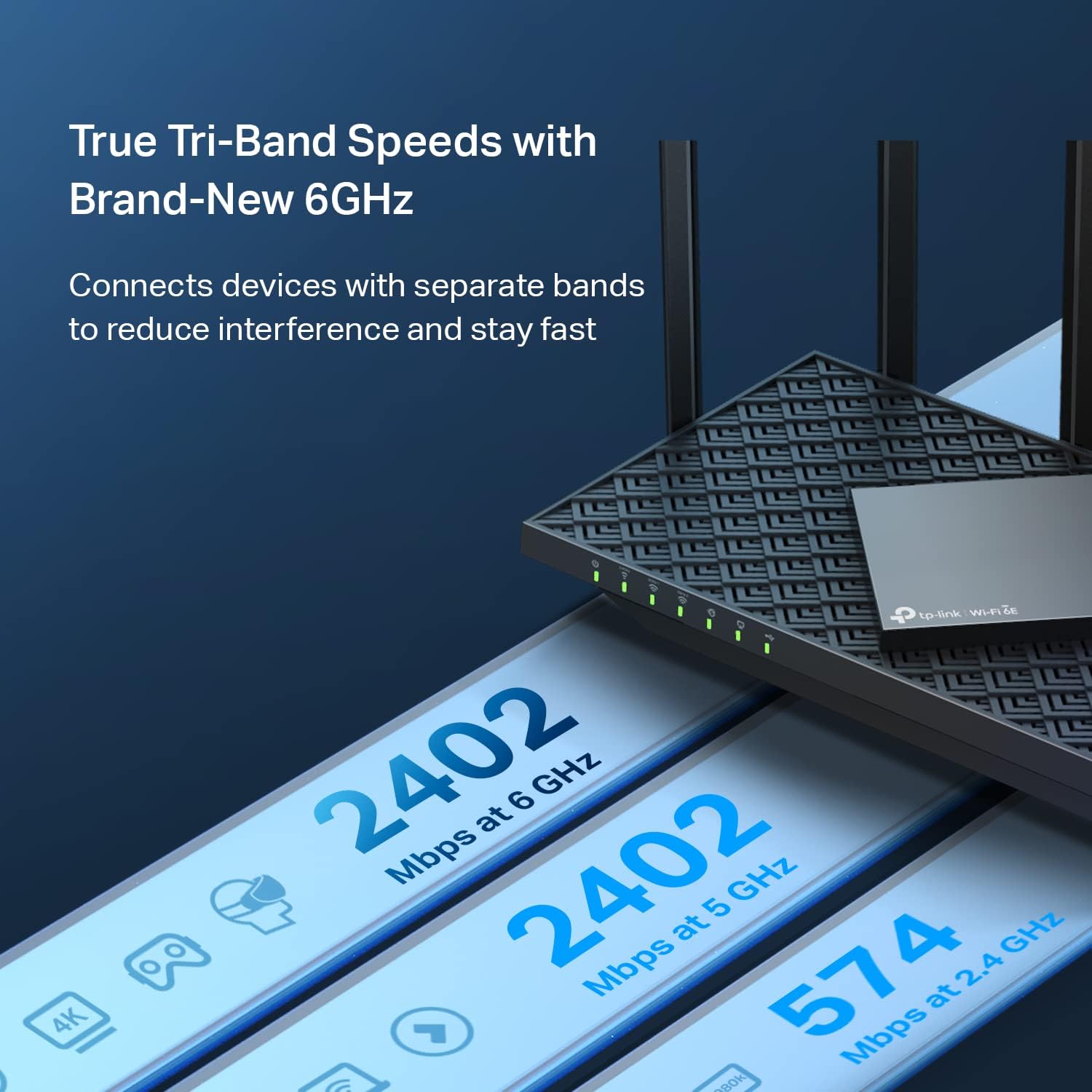
Tri-Band WiFi 6E Router – Up to 5400 Mbps WiFi for faster browsing, streaming, gaming and downloading, all at the same time(6 GHz: 2402 Mbps;5 GHz: 2402 Mbps;2.4 GHz: 574 Mbps)
WiFi 6E Unleashed – The brand new 6 GHz band brings more bandwidth, faster speeds, and near-zero latency; Enables more responsive gaming and video chatting
Connect More Devices—True Tri-Band and OFDMA technology increase capacity by 4 times to enable simultaneous transmission to more devices
More RAM, Better Processing – Armed with a 1.7 GHz Quad-Core CPU and 512 MB High-Speed Memory
OneMesh Supported – Creates a OneMesh network by connecting to a TP-Link OneMesh Extender for seamless whole-home coverage.
VPN Server and Client: Archer AXE75 Supports both VPN Server and VPN Client (OpenVPN/PPTP/L2TP)
TP-Link HomeShield – TP-Link’s premium security service keeps your home network safe with cutting-edge network and IoT protection. Free features: 1. Basic Network Security including Security Scan and IoT Device Identification 2. Basic Parental Controls 3. Quality of Service 4. Basic Weekly/Monthly Reports. Visit TP-Link website for more information.
Works with all internet service providers, such as AT&T, Verizon, Xfinity, Spectrum, RCN, Cox, CenturyLink, Frontier, etc.( a modem is required for most internet service providers)
9 reviews for TP-Link AXE5400 Tri-Band WiFi 6E Router (Archer AXE75), 2025 PCMag Editors’ Choice, Gigabit Internet for Gaming & Streaming, New 6GHz Band, 160MHz, OneMesh, Quad-Core CPU, VPN & WPA3 Security
Add a review

$116.00
Fredsaw –
Tp-Link AXE5400
I really regret not buying this TP-Link AXE5400 Wi-Fi 6E router earlier. The router from my internet provider only had two bands and a limited number of connected devices, which constantly caused issues. After switching to this router, those problems are completely gone.Now all my devices — and I have a lot of them — work perfectly stable with no random disconnects. I really love the tri-band setup. Smart home devices like cameras and robot vacuums run on the 2.4 GHz band, TVs, PlayStation, and gaming consoles use 5 GHz, and phones and laptops connect to the ultra-fast 6 GHz band. Everything is perfectly balanced and smooth.Setup was fast and easy, coverage is excellent throughout the house, and speeds are impressive on every band. Streaming, gaming, and working online all happen at the same time with zero lag or interruptions.This router has completely upgraded my home network. It’s powerful, reliable, and absolutely worth it. Highly recommended if you are tired of limitations from basic provider routers and want true Wi-Fi performance.
Lee B. –
Impressive Home Router
I needed to replace my aging Netgear Nighthawk router, which didn’t provide a great Wi-Fi signal at the outer limits of my home and was no longer eligible to receive firmware updates. After purchasing another a Netgear Mesh router system (and having nothing but constant connectivity issues), I returned that one. I did more research and ended up getting the TP-Link AXE5400. I had the best luck setting it up using the PC/Ethernet connection vs. the Tether phone APP that gave me trouble. The Admin via PC worked slick and I was quickly able to set up my network name & password and automatic firmware upgrades quickly.The router has been in-service for a week with no connectivity issues and great coverage throughout the house and out in the garage (where I couldn’t get Wi-Fi with my old router). I can see why this was a PC Mag Editor’s choice as this router has performed flawlessly. It’s nice to know that this router is ready to add a TP-Link range extender, but with such a strong signal, I doubt I’ll ever need it. Way to go TP-Link!
MK 1 –
Awesome Router for an Amazing Price
For the price this is one of the best values when looking at wifi 6E routers. It is simple to set up and has enough coverage for my entire home (a single wide trailer home). The 6Ghz band nearly covers the entire home as well, with occasional drops at the far corner. but stepping 3 feet closer to the router gives wifi speeds that previously could only be had right next to the old router. Through 3 (albeit thin) walls the 6ghz band provides around 600 mbps out of the 800 mbps coming from my ISP. On the 5ghz band, speeds are also around 600 mpps in the same room with the same device (Iphone 15 Pro) as mentioned before. Speeds depend both on the device used and distance to the router, so take my experience with a grain of salt. Overall: speeds and ease of use are phenomenal and provides enough bandwidth for many streaming devices and heavy downloads.
Melsman –
Good router; easy to set-up. Has some data sharing idiosyncrasies
I purchased this router based on the many very positive reviews posted here and online. I needed to replace my 5 year old Netgear router which was dropping connections so much that it was difficult to use, much less rely on. This AXE5400 router installed well, found all of my network-attached components, and seemed to integrate well with all of them. I like that it has three wireless classes; home, Guest, and IoT. I use all three in my home network. I have not used (nor do I want to use) their “Tether” app. I just don’t see the need and I don’t need another app trying to sell me something. I did not suffer any loss of needed functionality by not implementing the app, but it is annoying getting the pop-up every time I open the web interface. Oh well.The internal menu is fairly easy to understand and manipulate, even though most “assumptions” it makes during initialization are good and don’t need to be altered. Assigning fixed IP addresses and opening port sharing was straight-forward and easy to do.However, using the attached USB port for attached drive sharing needs some improvement. Though it recognized my attached USB drive without issue, the network drive name it assigns is “g”… and there’s no way to change it. So, even though you can change the volume name (I used “NAS”) the drive is going to be “g”. So, addressing it looks something like //nas/g. That’s just a minor tweak issue. But what was more annoying was how Win 11 Pro handles mounting the network drive.In the TP Link USB Drive set-up, you can toggle on “secure sharing”. I chose to leave this OFF while I reestablished all of my network components. My Win 10 Home computers connected and recognized the network drive fine. However, my Win 11 Pro machine kept asking for “Network Credentials”. Well, I hadn’t set up “network credentials” and couldn’t figure out what it was really asking for. So after much research and numerous altered settings and resultant dead-ends, I turned ON “secure sharing” in the router, added a user name and password for secure sharing, and went back and tried to connect my Win 11 Pro machine, entering the new credentials when asked. And BINGO! It worked! I guess Win 11 didn’t care whether I wanted to use unsecure sharing or not. It wasn’t going to have any of that nonsense! So, I don’t know if this is a TP Link thing, or a Windows 11 thing, but that was what worked for me.Otherwise, this router has been a great improvement over the old router. Good price, good functionality, easy set-up; 5 stars. Annoying app pop-up ad and poor interaction with Win 11 and USB drive sharing, minus 1 star.
Pedro S. –
I don’t have a super complex network but heavy enough that I needed more cpu power than provided by my ISP. I have a 3gbps connection and run a small 10gb network of a 10gb switch. Transfer speeds are optimal and it hasn’t gone down on heavy load of data transfers. This occurred with my ISP modem router all the time when I would run data transfer over the 10gbps data port. Wifi surprisingly handles my smart home of over 50 devices with a breeze. Will update should anything change but so far, i’m very satisfied
Stephen W. –
Superb router for houses with dead spots, builds a seamless mesh network with TP extenders. We’ve had perfect WiFi across the house since buying this.
Carbor Undium –
Es un equipo nuevo, que actualiza a otros modelos como el AX11000 que es un router similar de la misma marca. Es muy facil de configurar, muy sencillo e intuitivo. Es prácticamente un equipo para uso continuo y de batalla.La potenchai de todas sus bandas es extraordinaria, rompe muros y es muy estable.Lo unico malo que le encontré, es que a diferencia de su modelo predecesor, en esta version cobran extra por antivirus online, control parental y otras funciones. Cuando en su predecesor estaba incluido sin costo.
Khaldoon Al –
No disconnections, more Wifi distance, penetrates through concrete in close distance
MAG –
It working with excellent performance.Thanks