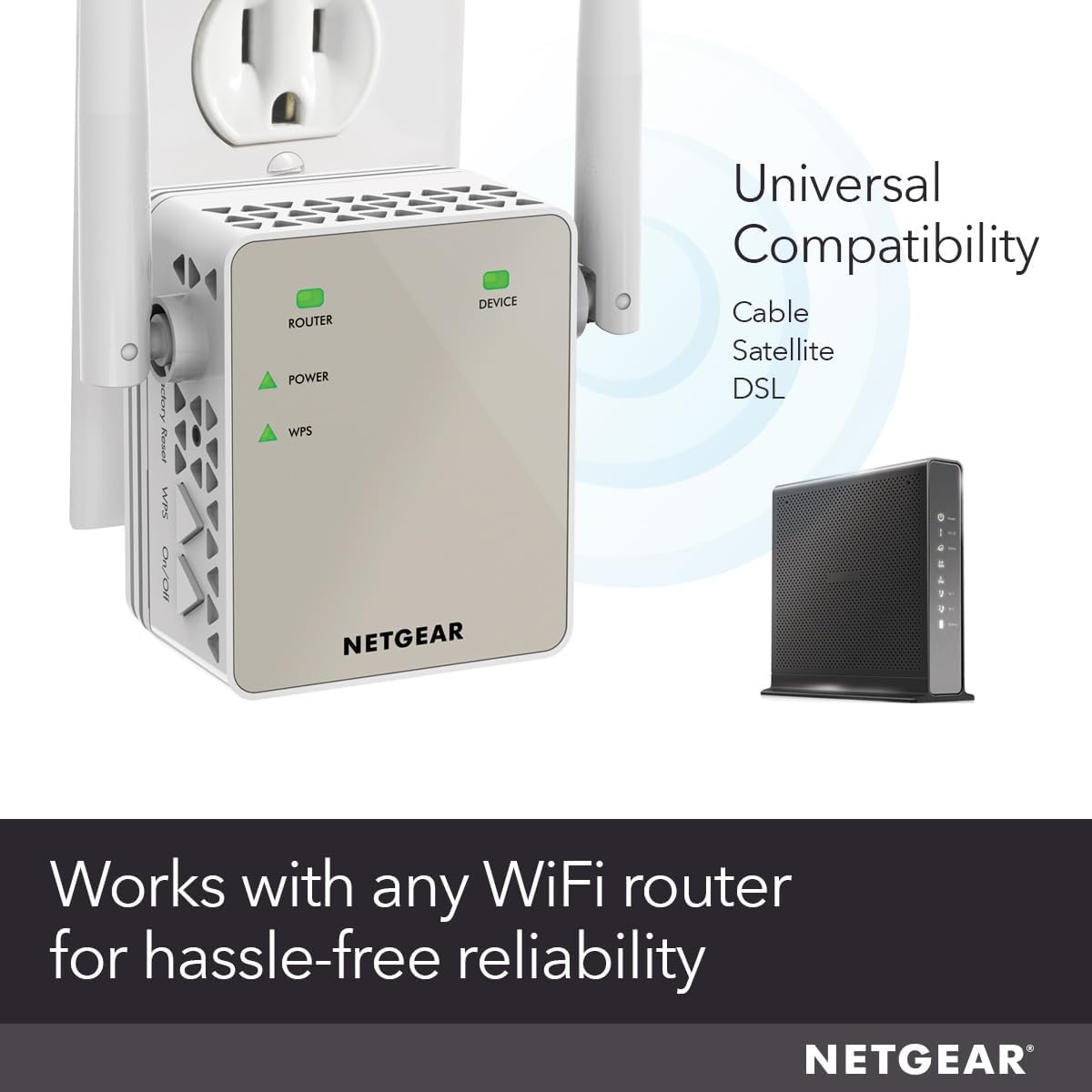
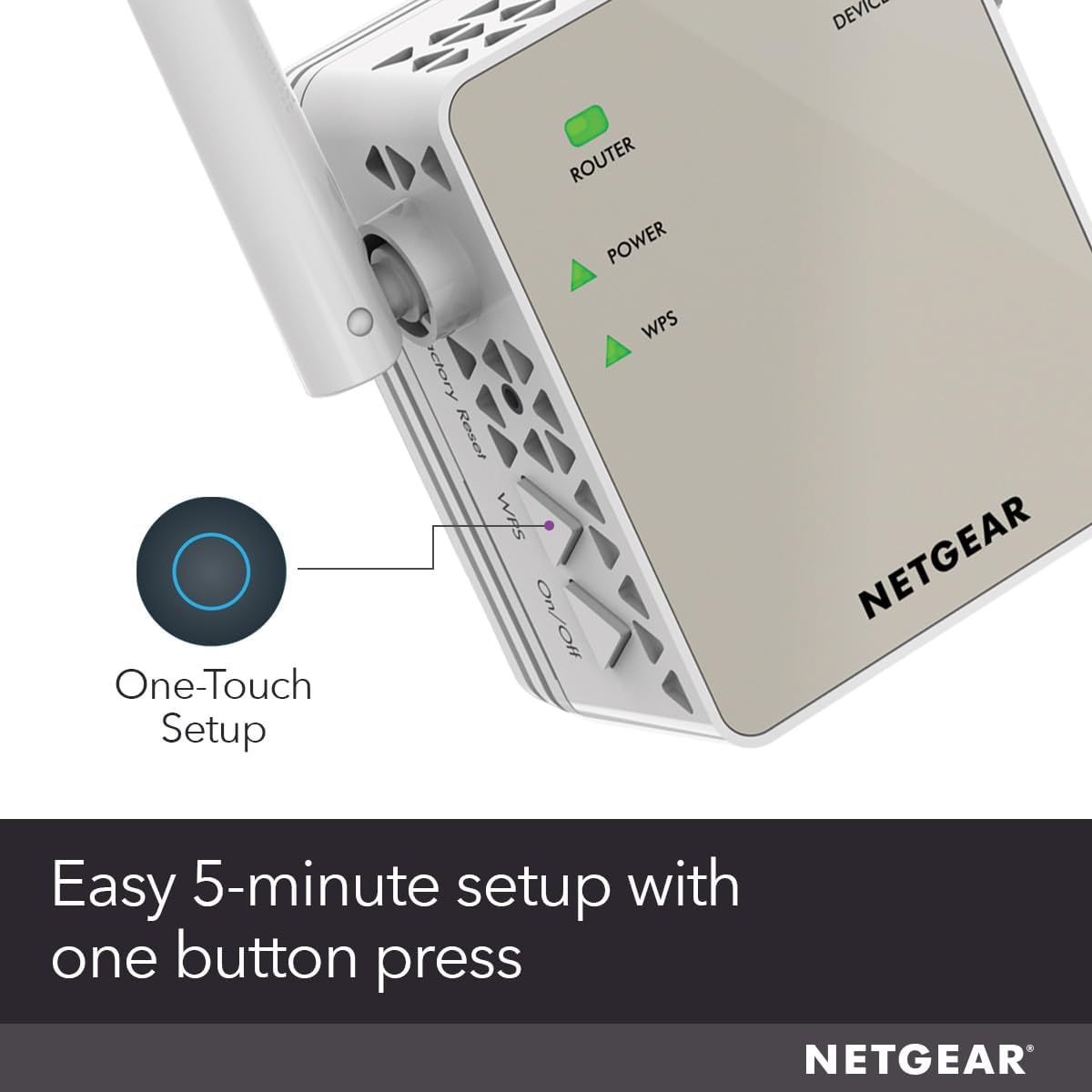
NETGEAR AC1200 Wi-Fi Range Extender, Ethernet Port, Works with any Wi-Fi Router (EX6120). Ease of Use: CD-less setup—great for mobile devices, Push ‘N’ Connect using Wi-Fi Protected Setup (WPS) 1. Adds WiFi range coverage up to 1500 sq ft, and connects up to 32 devices such as laptops, smartphones, speakers, IP cameras, tablets, IoT devices, and more. AC1200 WiFi (up to 1200Mbps speed) performance using dual-band and patented FastLane(TM) technology for video streaming and casual gaming Works with any wireless router, gateway, or cable modem with WiFi Plug in game consoles, streaming players or other nearby wired devices using the one 10/100M port for maximum speed. Supports WEP and WPA/WPA2 wireless security protocols
9 reviews for NETGEAR WiFi Range Extender (EX6120) – Add up to 1,500 sq. ft., 25 Devices – AC1200 Dual Band Wireless Signal Booster & Repeater (Up to 1.2 Gbps Speed), Compact Wall Plug Design – Free Expert Help
0.0out of 5
★★★★★
0
★★★★★
0
★★★★★
0
★★★★★
0
★★★★★
0
Write a review
Show allMost HelpfulHighest RatingLowest Rating
Ronald in the South –
Easy to Set-up & Connect
After logging into NetGears Setup Page and making a password and 2 security questions I found it fairly simple and quick to get the AC1200 WiFi Range Extender to lock into my router. I live in a mobile home and the WiFi connection in the living room where the router is located is fine but when you take your laptop or Ipad down to the other end of the trailer, in the bedrooms you lose quite a bit. On a lot of sites you would get a lot of buffering. Once I put AC1200 in the back bedroom it was like having the router in the room. Plus there are no cord connections, just plug it in the wall socket. If I want to use an Ethernet Cable with my laptop in the bedroom there is an Ethernet Port on the side of the AC1200 Extender to plug into. Some Extenders I reviewed before buying this one don’t have that feature. You can’t go wrong with this model. Works great. And if your a member of Amazon Prime you’ll get it in 2 days. I did.After logging into NetGears Setup Page and making a password and 2 security questions I found it fairly simple and quick to get the AC1200 WiFi Range Extender to lock into my router. I live in a mobile home and the WiFi connection in the living room where the router is located is fine but when you take your laptop or Ipad down to the other end of the trailer, in the bedrooms you lose quite a bit. On a lot of sites you would get a lot of buffering. Once I put AC1200 in the back bedroom it was like having the router in the room. Plus there are no cord connections, just plug it in the wall socket. If I want to use an Ethernet Cable with my laptop in the bedroom there is an Ethernet Port on the side of the AC1200 Extender to plug into. Some Extenders I reviewed before buying this one don’t have that feature. You can’t go wrong with this model. Works great. And if your a member of Amazon Prime you’ll get it in 2 days. I did.After logging into NetGears Setup Page and making a password and 2 security questions I found it fairly simple and quick to get the AC1200 WiFi Range Extender to lock into my router. I live in a mobile home and the WiFi connection in the living room where the router is located is fine but when you take your laptop or Ipad down to the other end of the trailer, in the bedrooms you lose quite a bit. On a lot of sites you would get a lot of buffering. Once I put AC1200 in the back bedroom it was like having the router in the room. Plus there are no cord connections, just plug it in the wall socket. If I want to use an Ethernet Cable with my laptop in the bedroom there is an Ethernet Port on the side of the AC1200 Extender to plug into. Some Extenders I reviewed before buying this one don’t have that feature. You can’t go wrong with this model. Works great. And if your a member of Amazon Prime you’ll get it in 2 days. I did.After logging into NetGears Setup Page and making a password and 2 security questions I found it fairly simple and quick to get the AC1200 WiFi Range Extender to lock into my router. I live in a mobile home and the WiFi connection in the living room where the router is located is fine but when you take your laptop or Ipad down to the other end of the trailer, in the bedrooms you lose quite a bit. On a lot of sites you would get a lot of buffering. Once I put AC1200 in the back bedroom it was like having the router in the room. Plus there are no cord connections, just plug it in the wall socket. If I want to use an Ethernet Cable with my laptop in the bedroom there is an Ethernet Port on the side of the AC1200 Extender to plug into. Some Extenders I reviewed before buying this one don’t have that feature. You can’t go wrong with this model. Works great. And if your a member of Amazon Prime you’ll get it in 2 days. I did.After logging into NetGears Setup Page and making a password and 2 security questions I found it fairly simple and quick to get the AC1200 WiFi Range Extender to lock into my router. I live in a mobile home and the WiFi connection in the living room where the router is located is fine but when you take your laptop or Ipad down to the other end of the trailer, in the bedrooms you lose quite a bit. On a lot of sites you would get a lot of buffering. Once I put AC1200 in the back bedroom it was like having the router in the room. Plus there are no cord connections, just plug it in the wall socket. If I want to use an Ethernet Cable with my laptop in the bedroom there is an Ethernet Port on the side of the AC1200 Extender to plug into. Some Extenders I reviewed before buying this one don’t have that feature. You can’t go wrong with this model. Works great. And if your a member of Amazon Prime you’ll get it in 2 days. I did.After logging into NetGears Setup Page and making a password and 2 security questions I found it fairly simple and quick to get the AC1200 WiFi Range Extender to lock into my router. I live in a mobile home and the WiFi connection in the living room where the router is located is fine but when you take your laptop or Ipad down to the other end of the trailer, in the bedrooms you lose quite a bit. On a lot of sites you would get a lot of buffering. Once I put AC1200 in the back bedroom it was like having the router in the room. Plus there are no cord connections, just plug it in the wall socket. If I want to use an Ethernet Cable with my laptop in the bedroom there is an Ethernet Port on the side of the AC1200 Extender to plug into. Some Extenders I reviewed before buying this one don’t have that feature. You can’t go wrong with this model. Works great. And if your a member of Amazon Prime you’ll get it in 2 days. I did.After logging into NetGears Setup Page and making a password and 2 security questions I found it fairly simple and quick to get the AC1200 WiFi Range Extender to lock into my router. I live in a mobile home and the WiFi connection in the living room where the router is located is fine but when you take your laptop or Ipad down to the other end of the trailer, in the bedrooms you lose quite a bit. On a lot of sites you would get a lot of buffering. Once I put AC1200 in the back bedroom it was like having the router in the room. Plus there are no cord connections, just plug it in the wall socket. If I want to use an Ethernet Cable with my laptop in the bedroom there is an Ethernet Port on the side of the AC1200 Extender to plug into. Some Extenders I reviewed before buying this one don’t have that feature. You can’t go wrong with this model. Works great. And if your a member of Amazon Prime you’ll get it in 2 days. I did.After logging into NetGears Setup Page and making a password and 2 security questions I found it fairly simple and quick to get the AC1200 WiFi Range Extender to lock into my router. I live in a mobile home and the WiFi connection in the living room where the router is located is fine but when you take your laptop or Ipad down to the other end of the trailer, in the bedrooms you lose quite a bit. On a lot of sites you would get a lot of buffering. Once I put AC1200 in the back bedroom it was like having the router in the room. Plus there are no cord connections, just plug it in the wall socket. If I want to use an Ethernet Cable with my laptop in the bedroom there is an Ethernet Port on the side of the AC1200 Extender to plug into. Some Extenders I reviewed before buying this one don’t have that feature. You can’t go wrong with this model. Works great. And if your a member of Amazon Prime you’ll get it in 2 days. I did.After logging into NetGears Setup Page and making a password and 2 security questions I found it fairly simple and quick to get the AC1200 WiFi Range Extender to lock into my router. I live in a mobile home and the WiFi connection in the living room where the router is located is fine but when you take your laptop or Ipad down to the other end of the trailer, in the bedrooms you lose quite a bit. On a lot of sites you would get a lot of buffering. Once I put AC1200 in the back bedroom it was like having the router in the room. Plus there are no cord connections, just plug it in the wall socket. If I want to use an Ethernet Cable with my laptop in the bedroom there is an Ethernet Port on the side of the AC1200 Extender to plug into. Some Extenders I reviewed before buying this one don’t have that feature. You can’t go wrong with this model. Works great. And if your a member of Amazon Prime you’ll get it in 2 days. I did.After logging into NetGears Setup Page and making a password and 2 security questions I found it fairly simple and quick to get the AC1200 WiFi Range Extender to lock into my router. I live in a mobile home and the WiFi connection in the living room where the router is located is fine but when you take your laptop or Ipad down to the other end of the trailer, in the bedrooms you lose quite a bit. On a lot of sites you would get a lot of buffering. Once I put AC1200 in the back bedroom it was like having the router in the room. Plus there are no cord connections, just plug it in the wall socket. If I want to use an Ethernet Cable with my laptop in the bedroom there is an Ethernet Port on the side of the AC1200 Extender to plug into. Some Extenders I reviewed before buying this one don’t have that feature. You can’t go wrong with this model. Works great. And if your a member of Amazon Prime you’ll get it in 2 days. I did.After logging into NetGears Setup Page and making a password and 2 security questions I found it fairly simple and quick to get the AC1200 WiFi Range Extender to lock into my router. I live in a mobile home and the WiFi connection in the living room where the router is located is fine but when you take your laptop or Ipad down to the other end of the trailer, in the bedrooms you lose quite a bit. On a lot of sites you would get a lot of buffering. Once I put AC1200 in the back bedroom it was like having the router in the room. Plus there are no cord connections, just plug it in the wall socket. If I want to use an Ethernet Cable with my laptop in the bedroom there is an Ethernet Port on the side of the AC1200 Extender to plug into. Some Extenders I reviewed before buying this one don’t have that feature. You can’t go wrong with this model. Works great. And if your a member of Amazon Prime you’ll get it in 2 days. I did.After logging into NetGears Setup Page and making a password and 2 security questions I found it fairly simple and quick to get the AC1200 WiFi Range Extender to lock into my router. I live in a mobile home and the WiFi connection in the living room where the router is located is fine but when you take your laptop or Ipad down to the other end of the trailer, in the bedrooms you lose quite a bit. On a lot of sites you would get a lot of buffering. Once I put AC1200 in the back bedroom it was like having the router in the room. Plus there are no cord connections, just plug it in the wall socket. If I want to use an Ethernet Cable with my laptop in the bedroom there is an Ethernet Port on the side of the AC1200 Extender to plug into. Some Extenders I reviewed before buying this one don’t have that feature. You can’t go wrong with this model. Works great. And if your a member of Amazon Prime you’ll get it in 2 days. I did.After logging into NetGears Setup Page and making a password and 2 security questions I found it fairly simple and quick to get the AC1200 WiFi Range Extender to lock into my router. I live in a mobile home and the WiFi connection in the living room where the router is located is fine but when you take your laptop or Ipad down to the other end of the trailer, in the bedrooms you lose quite a bit. On a lot of sites you would get a lot of buffering. Once I put AC1200 in the back bedroom it was like having the router in the room. Plus there are no cord connections, just plug it in the wall socket. If I want to use an Ethernet Cable with my laptop in the bedroom there is an Ethernet Port on the side of the AC1200 Extender to plug into. Some Extenders I reviewed before buying this one don’t have that feature. You can’t go wrong with this model. Works great. And if your a member of Amazon Prime you’ll get it in 2 days. I did.
Helpful(0)Unhelpful(0)You have already voted this
Thomas –
Good Budget Extender with Ok Range
This NETGEAR extender is affordable and works as expected, giving a solid range boost throughout my space. It’s a bit slower than I hoped, but still does the job for basic streaming and browsing. The setup was simple, and the range coverage is a little less than advertised. Overall, a good value option if you need a quick WiFi boost without spending much.
Helpful(0)Unhelpful(0)You have already voted this
Eric LaClaire –
Daisy chain works !
I daisey chained one of these extenders off of another and it works wonderfully. I know that’s a tech no no but check YouTube on how how to do it and it’s easy. My first extender is 50′ from my router and the second extender is 100′ from the other. I can stream video In my shop 150′ from my router as if I was 10′ away from it. I probably wouldn’t try to game at this distance but regular streaming works like a dream. This extender is awesome and I highly recommend it.
Helpful(0)Unhelpful(0)You have already voted this
DEdwards –
Nightmare to set up and impossible to decipher instruction manual
No stars. Returned it. Massive PIA to try to decipher the tech argot of the directions and it didn’t work anyway. I bought it to extend the range of my router’s wifi signal for an outdoor camera. Even after all the irritation involved with getting it paired to the house wifi and then plugging the extender into an outlet closer to the camera, it had zero impact on the camera’s signal. The location receives a strong 4-bar signal from the router, too. There’s no phone number to call for help with the setup unless you register the product first. The website you have to go to for the setup process doesn’t even bother to tell you up front, where it might be helpful, that you won’t ever see the setup assistant until you access Netgear’s web pages through the extender’s wifi, not your home router’s wifi. The website has links for setting up with a PC or Mac, but the one for Macs doesn’t work–the page never loads. Well, not until you’ve accidentally come across that information, on a completely different page that you found while looking for set-up help, that you have to access NetGear’s pages through the extender’s wifi signal, not the wifi from your own router.If you finally get to the setup assistant you will be asked questions you have no clue how to answer because they’re all in tech-speak. Why is it necessary to call a password a “network key”? Why don’t you just say “password”? “Make sure your computer is set up to use DHCP”. Really. I’ll get right on that. I’ve been using personal computers for 30 years and have never seen the term “DHCP” and have no idea how to check that my computer is set up to use it, but since you bring it up, why don’t you tell me how to “make sure” of that? Worthless. The whole instruction guide is like that and the setup assistant is worse by far. And hey, did you know that “WPS does not support WEP network security”? Who cares, if you don’t know what either of those things are and if they don’t tell you how to determine which your wifi has? The manual will tell you things like, “Click the Next button and the status screen displays”. Wrong. Like a lot of the other steps. You know what happens when you click Next? The setup assistant completely vanishes and you end up back on NetGear’s main web page. You are not offered something logical for the next step in the process, like a log-in setup option, or a flashing neon sign that says “setup complete” or any information on the status of the device you think you maybe might have possibly just set up. Nothing. Here’s our web page. Enjoy this total lack of feedback about what you were just trying to accomplish and whether it worked or not.No idea whether their phone tech support is any good or not because I put the device back in the box and printed a return label, but phone support is good for only 90 days anyway. Besides, you have to register the product first–so they can have your personal information and probably put you on 20,000 mailing lists for spam–before they’ll give you access to the super-duper-secret-classified help line number. Never trust a company that won’t give you free phone setup help in its instruction manual.
Helpful(0)Unhelpful(0)You have already voted this
Minita Sinha –
It’s very convenient to installIt’s very useful for those apartments where bedroom has low signal strength.It strengthens the signal strength.
Helpful(0)Unhelpful(0)You have already voted this
Gisele –
Fonctionne bien
Helpful(0)Unhelpful(0)You have already voted this
Placeholder –
I love it man.. I had alot issues with wifi signal in bedroom, I just plugged it, and it is working perfectly fine.
Helpful(0)Unhelpful(0)You have already voted this
Luis Aguilar –
Facil de instalar, muy buena cobertura, la señal se extiende entre 30 y 40 metros fuera de la casa. Recfomendable
Helpful(0)Unhelpful(0)You have already voted this
Gord J. –
Piece of garbage lasted less than a day. Now I can’t get it picked up to get refund. It installed fine, worked for a day and then disconnected every 3 or 4 hours. The Netgear extender it replaced lasted longer but failed too. I’d complain about the third one not working but fool me three times shame on me. Does anyone have a suggestion for a good extender that is not Netgear?





Ronald in the South –
Easy to Set-up & Connect
After logging into NetGears Setup Page and making a password and 2 security questions I found it fairly simple and quick to get the AC1200 WiFi Range Extender to lock into my router. I live in a mobile home and the WiFi connection in the living room where the router is located is fine but when you take your laptop or Ipad down to the other end of the trailer, in the bedrooms you lose quite a bit. On a lot of sites you would get a lot of buffering. Once I put AC1200 in the back bedroom it was like having the router in the room. Plus there are no cord connections, just plug it in the wall socket. If I want to use an Ethernet Cable with my laptop in the bedroom there is an Ethernet Port on the side of the AC1200 Extender to plug into. Some Extenders I reviewed before buying this one don’t have that feature. You can’t go wrong with this model. Works great. And if your a member of Amazon Prime you’ll get it in 2 days. I did.After logging into NetGears Setup Page and making a password and 2 security questions I found it fairly simple and quick to get the AC1200 WiFi Range Extender to lock into my router. I live in a mobile home and the WiFi connection in the living room where the router is located is fine but when you take your laptop or Ipad down to the other end of the trailer, in the bedrooms you lose quite a bit. On a lot of sites you would get a lot of buffering. Once I put AC1200 in the back bedroom it was like having the router in the room. Plus there are no cord connections, just plug it in the wall socket. If I want to use an Ethernet Cable with my laptop in the bedroom there is an Ethernet Port on the side of the AC1200 Extender to plug into. Some Extenders I reviewed before buying this one don’t have that feature. You can’t go wrong with this model. Works great. And if your a member of Amazon Prime you’ll get it in 2 days. I did.After logging into NetGears Setup Page and making a password and 2 security questions I found it fairly simple and quick to get the AC1200 WiFi Range Extender to lock into my router. I live in a mobile home and the WiFi connection in the living room where the router is located is fine but when you take your laptop or Ipad down to the other end of the trailer, in the bedrooms you lose quite a bit. On a lot of sites you would get a lot of buffering. Once I put AC1200 in the back bedroom it was like having the router in the room. Plus there are no cord connections, just plug it in the wall socket. If I want to use an Ethernet Cable with my laptop in the bedroom there is an Ethernet Port on the side of the AC1200 Extender to plug into. Some Extenders I reviewed before buying this one don’t have that feature. You can’t go wrong with this model. Works great. And if your a member of Amazon Prime you’ll get it in 2 days. I did.After logging into NetGears Setup Page and making a password and 2 security questions I found it fairly simple and quick to get the AC1200 WiFi Range Extender to lock into my router. I live in a mobile home and the WiFi connection in the living room where the router is located is fine but when you take your laptop or Ipad down to the other end of the trailer, in the bedrooms you lose quite a bit. On a lot of sites you would get a lot of buffering. Once I put AC1200 in the back bedroom it was like having the router in the room. Plus there are no cord connections, just plug it in the wall socket. If I want to use an Ethernet Cable with my laptop in the bedroom there is an Ethernet Port on the side of the AC1200 Extender to plug into. Some Extenders I reviewed before buying this one don’t have that feature. You can’t go wrong with this model. Works great. And if your a member of Amazon Prime you’ll get it in 2 days. I did.After logging into NetGears Setup Page and making a password and 2 security questions I found it fairly simple and quick to get the AC1200 WiFi Range Extender to lock into my router. I live in a mobile home and the WiFi connection in the living room where the router is located is fine but when you take your laptop or Ipad down to the other end of the trailer, in the bedrooms you lose quite a bit. On a lot of sites you would get a lot of buffering. Once I put AC1200 in the back bedroom it was like having the router in the room. Plus there are no cord connections, just plug it in the wall socket. If I want to use an Ethernet Cable with my laptop in the bedroom there is an Ethernet Port on the side of the AC1200 Extender to plug into. Some Extenders I reviewed before buying this one don’t have that feature. You can’t go wrong with this model. Works great. And if your a member of Amazon Prime you’ll get it in 2 days. I did.After logging into NetGears Setup Page and making a password and 2 security questions I found it fairly simple and quick to get the AC1200 WiFi Range Extender to lock into my router. I live in a mobile home and the WiFi connection in the living room where the router is located is fine but when you take your laptop or Ipad down to the other end of the trailer, in the bedrooms you lose quite a bit. On a lot of sites you would get a lot of buffering. Once I put AC1200 in the back bedroom it was like having the router in the room. Plus there are no cord connections, just plug it in the wall socket. If I want to use an Ethernet Cable with my laptop in the bedroom there is an Ethernet Port on the side of the AC1200 Extender to plug into. Some Extenders I reviewed before buying this one don’t have that feature. You can’t go wrong with this model. Works great. And if your a member of Amazon Prime you’ll get it in 2 days. I did.After logging into NetGears Setup Page and making a password and 2 security questions I found it fairly simple and quick to get the AC1200 WiFi Range Extender to lock into my router. I live in a mobile home and the WiFi connection in the living room where the router is located is fine but when you take your laptop or Ipad down to the other end of the trailer, in the bedrooms you lose quite a bit. On a lot of sites you would get a lot of buffering. Once I put AC1200 in the back bedroom it was like having the router in the room. Plus there are no cord connections, just plug it in the wall socket. If I want to use an Ethernet Cable with my laptop in the bedroom there is an Ethernet Port on the side of the AC1200 Extender to plug into. Some Extenders I reviewed before buying this one don’t have that feature. You can’t go wrong with this model. Works great. And if your a member of Amazon Prime you’ll get it in 2 days. I did.After logging into NetGears Setup Page and making a password and 2 security questions I found it fairly simple and quick to get the AC1200 WiFi Range Extender to lock into my router. I live in a mobile home and the WiFi connection in the living room where the router is located is fine but when you take your laptop or Ipad down to the other end of the trailer, in the bedrooms you lose quite a bit. On a lot of sites you would get a lot of buffering. Once I put AC1200 in the back bedroom it was like having the router in the room. Plus there are no cord connections, just plug it in the wall socket. If I want to use an Ethernet Cable with my laptop in the bedroom there is an Ethernet Port on the side of the AC1200 Extender to plug into. Some Extenders I reviewed before buying this one don’t have that feature. You can’t go wrong with this model. Works great. And if your a member of Amazon Prime you’ll get it in 2 days. I did.After logging into NetGears Setup Page and making a password and 2 security questions I found it fairly simple and quick to get the AC1200 WiFi Range Extender to lock into my router. I live in a mobile home and the WiFi connection in the living room where the router is located is fine but when you take your laptop or Ipad down to the other end of the trailer, in the bedrooms you lose quite a bit. On a lot of sites you would get a lot of buffering. Once I put AC1200 in the back bedroom it was like having the router in the room. Plus there are no cord connections, just plug it in the wall socket. If I want to use an Ethernet Cable with my laptop in the bedroom there is an Ethernet Port on the side of the AC1200 Extender to plug into. Some Extenders I reviewed before buying this one don’t have that feature. You can’t go wrong with this model. Works great. And if your a member of Amazon Prime you’ll get it in 2 days. I did.After logging into NetGears Setup Page and making a password and 2 security questions I found it fairly simple and quick to get the AC1200 WiFi Range Extender to lock into my router. I live in a mobile home and the WiFi connection in the living room where the router is located is fine but when you take your laptop or Ipad down to the other end of the trailer, in the bedrooms you lose quite a bit. On a lot of sites you would get a lot of buffering. Once I put AC1200 in the back bedroom it was like having the router in the room. Plus there are no cord connections, just plug it in the wall socket. If I want to use an Ethernet Cable with my laptop in the bedroom there is an Ethernet Port on the side of the AC1200 Extender to plug into. Some Extenders I reviewed before buying this one don’t have that feature. You can’t go wrong with this model. Works great. And if your a member of Amazon Prime you’ll get it in 2 days. I did.After logging into NetGears Setup Page and making a password and 2 security questions I found it fairly simple and quick to get the AC1200 WiFi Range Extender to lock into my router. I live in a mobile home and the WiFi connection in the living room where the router is located is fine but when you take your laptop or Ipad down to the other end of the trailer, in the bedrooms you lose quite a bit. On a lot of sites you would get a lot of buffering. Once I put AC1200 in the back bedroom it was like having the router in the room. Plus there are no cord connections, just plug it in the wall socket. If I want to use an Ethernet Cable with my laptop in the bedroom there is an Ethernet Port on the side of the AC1200 Extender to plug into. Some Extenders I reviewed before buying this one don’t have that feature. You can’t go wrong with this model. Works great. And if your a member of Amazon Prime you’ll get it in 2 days. I did.After logging into NetGears Setup Page and making a password and 2 security questions I found it fairly simple and quick to get the AC1200 WiFi Range Extender to lock into my router. I live in a mobile home and the WiFi connection in the living room where the router is located is fine but when you take your laptop or Ipad down to the other end of the trailer, in the bedrooms you lose quite a bit. On a lot of sites you would get a lot of buffering. Once I put AC1200 in the back bedroom it was like having the router in the room. Plus there are no cord connections, just plug it in the wall socket. If I want to use an Ethernet Cable with my laptop in the bedroom there is an Ethernet Port on the side of the AC1200 Extender to plug into. Some Extenders I reviewed before buying this one don’t have that feature. You can’t go wrong with this model. Works great. And if your a member of Amazon Prime you’ll get it in 2 days. I did.After logging into NetGears Setup Page and making a password and 2 security questions I found it fairly simple and quick to get the AC1200 WiFi Range Extender to lock into my router. I live in a mobile home and the WiFi connection in the living room where the router is located is fine but when you take your laptop or Ipad down to the other end of the trailer, in the bedrooms you lose quite a bit. On a lot of sites you would get a lot of buffering. Once I put AC1200 in the back bedroom it was like having the router in the room. Plus there are no cord connections, just plug it in the wall socket. If I want to use an Ethernet Cable with my laptop in the bedroom there is an Ethernet Port on the side of the AC1200 Extender to plug into. Some Extenders I reviewed before buying this one don’t have that feature. You can’t go wrong with this model. Works great. And if your a member of Amazon Prime you’ll get it in 2 days. I did.
Thomas –
Good Budget Extender with Ok Range
This NETGEAR extender is affordable and works as expected, giving a solid range boost throughout my space. It’s a bit slower than I hoped, but still does the job for basic streaming and browsing. The setup was simple, and the range coverage is a little less than advertised. Overall, a good value option if you need a quick WiFi boost without spending much.
Eric LaClaire –
Daisy chain works !
I daisey chained one of these extenders off of another and it works wonderfully. I know that’s a tech no no but check YouTube on how how to do it and it’s easy. My first extender is 50′ from my router and the second extender is 100′ from the other. I can stream video In my shop 150′ from my router as if I was 10′ away from it. I probably wouldn’t try to game at this distance but regular streaming works like a dream. This extender is awesome and I highly recommend it.
DEdwards –
Nightmare to set up and impossible to decipher instruction manual
No stars. Returned it. Massive PIA to try to decipher the tech argot of the directions and it didn’t work anyway. I bought it to extend the range of my router’s wifi signal for an outdoor camera. Even after all the irritation involved with getting it paired to the house wifi and then plugging the extender into an outlet closer to the camera, it had zero impact on the camera’s signal. The location receives a strong 4-bar signal from the router, too. There’s no phone number to call for help with the setup unless you register the product first. The website you have to go to for the setup process doesn’t even bother to tell you up front, where it might be helpful, that you won’t ever see the setup assistant until you access Netgear’s web pages through the extender’s wifi, not your home router’s wifi. The website has links for setting up with a PC or Mac, but the one for Macs doesn’t work–the page never loads. Well, not until you’ve accidentally come across that information, on a completely different page that you found while looking for set-up help, that you have to access NetGear’s pages through the extender’s wifi signal, not the wifi from your own router.If you finally get to the setup assistant you will be asked questions you have no clue how to answer because they’re all in tech-speak. Why is it necessary to call a password a “network key”? Why don’t you just say “password”? “Make sure your computer is set up to use DHCP”. Really. I’ll get right on that. I’ve been using personal computers for 30 years and have never seen the term “DHCP” and have no idea how to check that my computer is set up to use it, but since you bring it up, why don’t you tell me how to “make sure” of that? Worthless. The whole instruction guide is like that and the setup assistant is worse by far. And hey, did you know that “WPS does not support WEP network security”? Who cares, if you don’t know what either of those things are and if they don’t tell you how to determine which your wifi has? The manual will tell you things like, “Click the Next button and the status screen displays”. Wrong. Like a lot of the other steps. You know what happens when you click Next? The setup assistant completely vanishes and you end up back on NetGear’s main web page. You are not offered something logical for the next step in the process, like a log-in setup option, or a flashing neon sign that says “setup complete” or any information on the status of the device you think you maybe might have possibly just set up. Nothing. Here’s our web page. Enjoy this total lack of feedback about what you were just trying to accomplish and whether it worked or not.No idea whether their phone tech support is any good or not because I put the device back in the box and printed a return label, but phone support is good for only 90 days anyway. Besides, you have to register the product first–so they can have your personal information and probably put you on 20,000 mailing lists for spam–before they’ll give you access to the super-duper-secret-classified help line number. Never trust a company that won’t give you free phone setup help in its instruction manual.
Minita Sinha –
It’s very convenient to installIt’s very useful for those apartments where bedroom has low signal strength.It strengthens the signal strength.
Gisele –
Fonctionne bien
Placeholder –
I love it man.. I had alot issues with wifi signal in bedroom, I just plugged it, and it is working perfectly fine.
Luis Aguilar –
Facil de instalar, muy buena cobertura, la señal se extiende entre 30 y 40 metros fuera de la casa. Recfomendable
Gord J. –
Piece of garbage lasted less than a day. Now I can’t get it picked up to get refund. It installed fine, worked for a day and then disconnected every 3 or 4 hours. The Netgear extender it replaced lasted longer but failed too. I’d complain about the third one not working but fool me three times shame on me. Does anyone have a suggestion for a good extender that is not Netgear?