

Box Pro, 1080p@60fps Video Recorder, DVR with HDMI Capture, Playback on TV. RCA/YPbPr/VGA to Digital Converter. Schedule Recording. No PC Required.
$195.60
Related Products




Product description

A versatile user-friendly video recording box. Easy to get started no matter what source device you’re using. (CAN NOT Record Smart TV or Antenna TV)
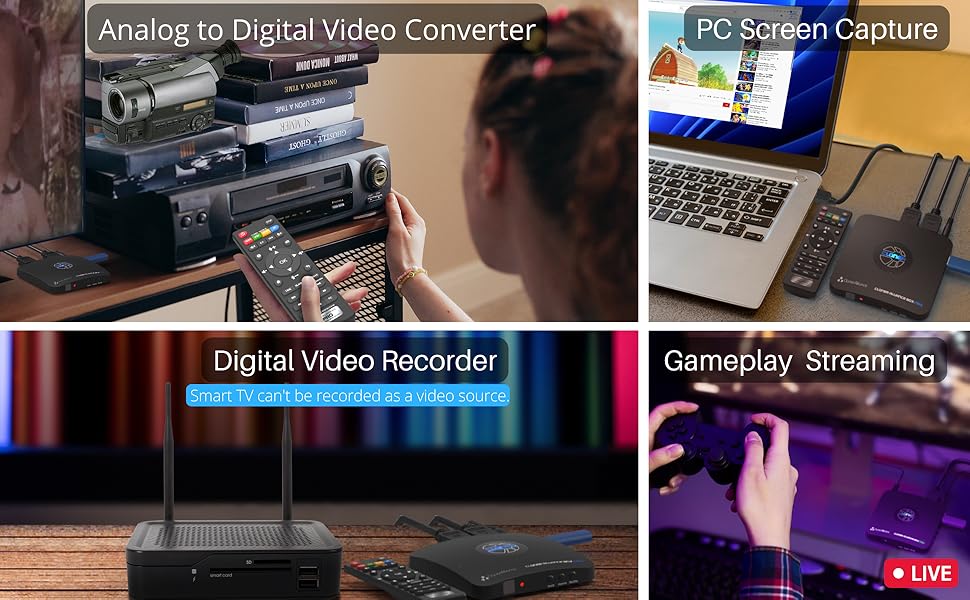
Standalone Analog to Digital Video Converter
Converts analog videos to digital video files(MP4/H.264). No PC is required.Supports Composite/RCA and Component/YPbPr, and VGA input signals.
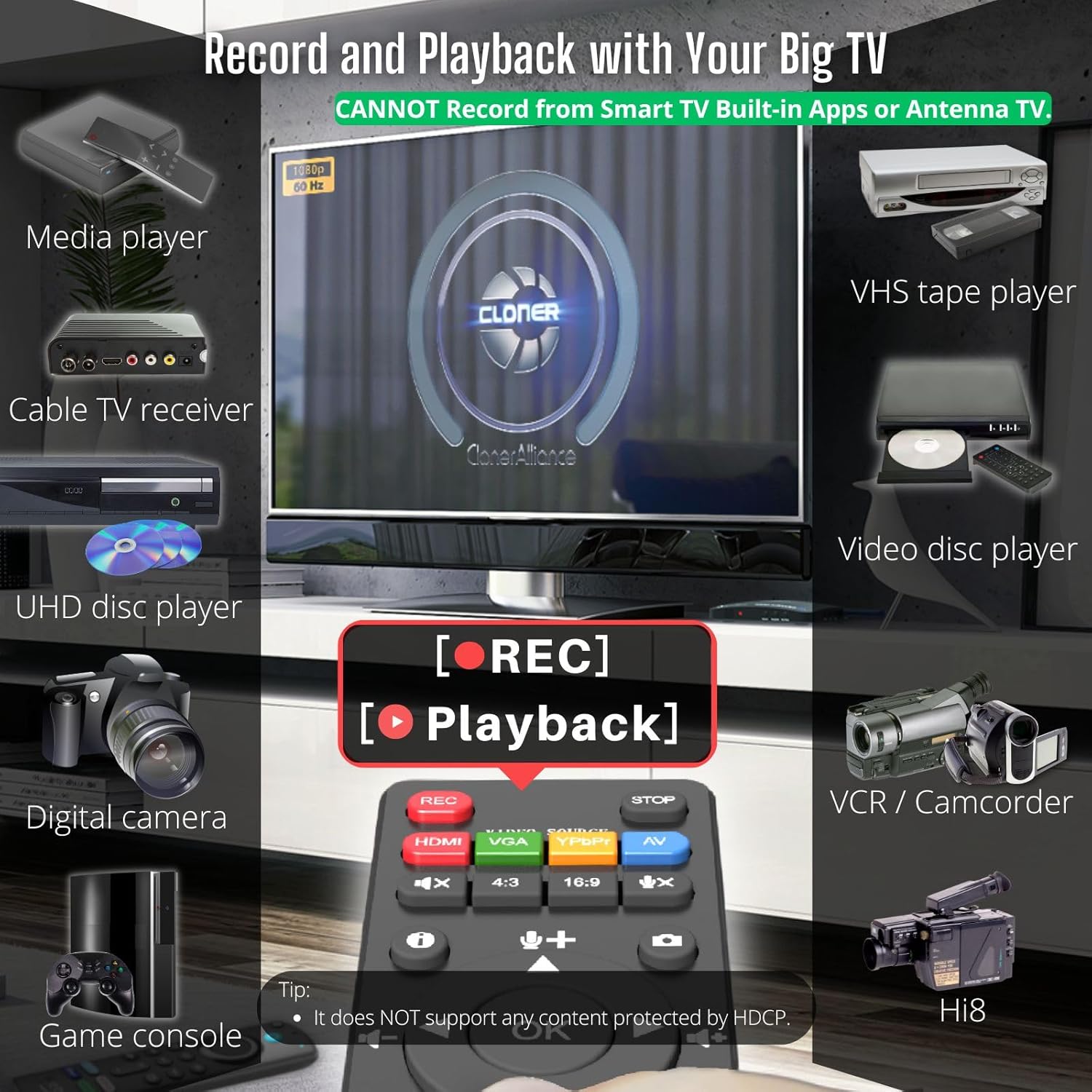
Standalone Digital Video Recorder (Smart TVs/Antennas are NOT compatible)
Supports HDMI input signal.Captures Full HD videos or gameplay from game consoles, DVR, VCR, etc onto a USB flash drive or external hard disk. PC Free.IMPORTANT: 4K input(3840*2160@30fps) is supported, but all output signals and recorded videos will be in 1080p@60fps. This resolution conversion is normal and expected.
Instant Playback
Instantly Playback recorded videos on USB storage devices with the remote.No need to get up from your couch to check the status of the recording anymore. (The recorded MP4 files can be played back using your computer’s software player as well.)
Easy to use for everyone
Suitable for both beginners and professional video creators.No matter what age you are, you can master it quickly.
Your next Must-Have next to your TV

Connect and it’s done! Just sit on the couch and do the rest with the remote.
Some of your most cherished moments like birthday parties or weddings in life may be on VCR or other analog signal devices.
Take your time to backup them now! ClonerAlliance Box Pro enables you to record videos from any device with a Composite/RCA, Component/YPbPr, or VGA output and keep them forever.
And then just press the “PLAYBACK” button on the remote, and you can enjoy the recorded videos instantly.
What’s more? OSD menu provides a variety of functions: Record Resolution, Bitrate, Brightness, Contrast, Schedule Recording, etc.
Digitize Your Precious Memories to Modern Devices

Do you have VHS tapes or video discs that need to be converted to MP4 digital files? Or you have too many video files saved on your DVR and need to free its storage space. With ClonerAlliance Box Pro, just one press, all your favorite videos can be stored on your USB storage devices.
The recorded MP4 files are compatible with PCs, Tablets, Mobile phones, and any other modern devices, including your smart TV.
Smooth 1080p@60fps recording in various scenarios
Easy to Use. Everyone Can Be a Pro
Take in digital or various analog signals and switch the video source freely with the remote, no need to repeatedly plug and unplug devices.
Widely compatible with high-capacity USB flash drives(Up to 512GB) or external hard drives (Up to 8TB).
You can also use it to capture your PC’s screen for recording video conferences, online courses, and any other content. Like a Pro.
With 3rd party software such as OBS, XSplit, etc, allows you to capture and live HD gaming videos from any game console. The internal 3.5mm mic jack allows you to add your own live commentary.
Audio and USB storage device Tip:
The product records PCM or Stereo format. Please adjust the audio output of the source device to PCM or Stereo.
It’s recommended that the reading and writing speeds of the USB storage device are both 50Mbps or above.
Learn More about ClonerAlliance Box Pro

Do more with your PC
Everyone can easily get started with PC MODE.
Use OBS Studio and ClonerAlliance Helper to live stream or record videos.
Connect ClonerAlliance Box Pro with your PC, and then you can record and live games/videos on YouTube/Twitch/Facebook, and other live platforms.
Windows system is required.Please install ClonerAlliance Helper first before using OBS studio.Mac/Linux are not supported with PC MODE.

Schedule recording
Schedule recording at your convenience.
You must want to enjoy the latest sporting events and stay up to date with your favorite videos.
Set up your video source, select the target channel, schedule recording task. ClonerAlliance Box Pro will do the rest for you.
Tip: Ensure you select the desired channel on your device before recording. You can’t watch a different channel while recording another.

One press to snapshot
Press one button to take a screenshot as a JPG file.
Amazing or hilarious moments while watching videos won’t wait your camera to capture.
Just one press can make it. Stores them into a folder so as to browse them anytime.

Widely compatibility
ClonerAlliance Box Pro is compatible with video sources with standard HDMI (Type-A), RCA/composite, component/YPbPr, VGA output ports.
Use the included HDMI cable or MMI connector to make a connection and start recording.
Please check the Compatible Video Sources in the technical specification table below.The Smart TV & TV Antenna can’t be a video Source.
For the Mini-HDMI(TYPE-C) or Micro-HDMI(TYPE-D) port, a To TYPE-A adapter is required (Not included).
For the Female (RCA/VGA)ports, a Male-to-Male cable is required (Not included).
More Reasons to Have ClonerAlliance Box Pro

Supports exFAT, NTFS, FAT/FAT32, MBR,GPT
Not only is it compatible with GPT and MBR partition structures, it can also write MP4 files to exFAT, NTFS, FAT/FAT file systems. Whether you are using a retro computer system or a modern PC system (Windows, Mac OS, Android, Linux), the recorded MP4 video files can be safely saved forever.

Simple setup with 3 steps
Connect your video source’s output port to the input port of the ClonerAlliance Box Pro.Connect the ClonerAlliance Box Pro’s output port to your TVPlug a USB drive into the “Storage” port of the ClonerAlliance Box Pro.
IMPORTANT: CANNOT Record from Smart TV Built-in Apps or Antenna TV.
If you see a “No Signal” message, note the device defaults to HDMI input—switch to the corresponding input via the remote when recording from AV/VGA/YPbPr sources.
All set and enjoy!

Trusted by folks
Since launched in 2016, ClonerAlliance Box Pro has been trusted by customers. Over the years, it has also been continuously improved to meet the more recording and capture needs.

Long-term Service
We provide 90-Day No Hassle Return (at our cost) and 2-Year Replacement Service.
A longer service period gives you more peace of mind while using our products.
Technical Specifications
Video Recording Resolution Max up to 1920 x 1080@60fps Max Encoding Bitrate 22Mbps Passthrough Latency Less than 90ms Encode Formats MP4/H.264 Maximum Storage Capacity 8TB HDMI Input Resolution Max up to 3840 x 2160@ 30fps Analog Video Input Resolution RCA/Composite Input: 480i(NTSC)/576i(PAL). YPbPr/Component Input: Up to 1080p@60fps. VGA Input: Up to 1080p@60fps Analog Video Input Formats NTSC, PAL,PAL-60 Recording Aspect Ratio 16:9; 4:3 Compatible File System FAT32,NTFS,exFAT. MBR,GPT Compatible Video Sources Hi8 camcorders, VHS Players, VCRs, DVRs, Set top Boxes, Cable TV Receivers, DVD Players, Media players, TV Sticks, Endoscopes, Surgery Microscopes, Game Consoles, VGA Graphic Cards, Laptops with HDMI/VGA OUT. [The Smart TV & TV Antenna can’t be a video Source.]
What can it do? – Standalone 1080p@60fps video capture device and digital video recorder. Record video to a USB storage device while watching it on TV, playback the recorded video on TV with the included remote, No PC required at all. Analog to digital video converter, HDMI/RCA/Composite/Component/YPbPr/VGA inputs are supported. Gaming capture and live are also available if you prefer using a PC.
Why do I need it? – Digitalize or archive analog videos to MP4 files from old devices without using a PC. Backup videos from HD/UHD video discs and old VHS tapes. Gaming capture and live. Capture and record videos from cable TV receivers, set-top boxes, PVRs or DVRs. Record online conferencing video. Record online HD video for recreating. Capture screen contents of PC.
Why choose it over other similar products? – Friendly to use by newbies or older adults. Specifically designed for work with big screen TVs and HD/UHD/Analog video players. Recorded MP4 files can be saved on both retro and modern PCs (exFAT, NTFS, FAT/FAT32, MBR,GPT). Ultra-low latency (less 90ms). Various schedule tasks. Trusted since 2016.
Is my device compatible with it? – It works with: VHS Players, VCRs, Camcorders, Hi8 camcorders, DVRs, Set-top Boxes, Video disc Players, Media players, TV Sticks, Endoscopes, Surgery Microscopes, Game Consoles, and any other devices with HDMI/RCA/Composite/Component/VGA Output. [Tip: The Smart TV & TV Antenna can’t be a video Source.]
What’s more? – 90-Day No Hassle Return (at our cost) and 2-Year replacement Service. Free video edit/conversion software included(Windows system only. Mac is not supported). [The device does not support any content protected by HDCP. When connected to an HDCP (Content Protection) source, it will output an error message or nothing. This does not indicate a defect.]
7 reviews for Box Pro, 1080p@60fps Video Recorder, DVR with HDMI Capture, Playback on TV. RCA/YPbPr/VGA to Digital Converter. Schedule Recording. No PC Required.
Add a review

$195.60
Tom M –
I LOVE MY CLONER BOX PRO!
I initially purchased the HDML Cloner Box (non Pro) because of the good Amazon reviews. I was looking for an HD DVR device and the HDML Cloner Box reviews said that it would record virtually anything across an HDMI connection with excellent video quality. I ran into the common issue of the “blank screen” after hooking up the Cloner Box and went the manufacturer web site (Cloner-Alliance) for help and found the “Pro” model with Remote Control, Timer Recordings, and Instant Playback. The Pro being a new product had no reviews on Amazon so I didn’t see it on first pass. After testing the Cloner Box and seeing for myself that recorded everything I tried (CATV, Blue Ray, PC Stream) with Excellent Quality, I instantly purchased the Pro Model and arranged to return the Box version. The blank screen on the Box version was resolved by pressing the 1080/720 button for 5 seconds (you do the same with the Input button on the Pro).In addition to wanting an HD DVR, I also am in the process of moving my owned DVDs and Blue Rays to MP4 files for my Home Theater Server. I have another software solution for moving my Blue-Ray movies to MP4, but the Cloner Box can do that too. I have found using the Cloner Box for the “Extras” is nice because I have to view them to choose which one to copy and it is easier on the Cloner than the software solution.I LOVE the HDML Cloner Box Pro. Similar to the non-Pro Box, it records EVERYTHING coming across the HDMI port with EXCELLENT Video quality. The Remote functionality is fantastic. I have yet to test the Timer recording, but understand how it works. The Pro also allows you to Record on the PC through a 2nd Mini-USB port using their HDML-Cloner Pro Helper Application. The PC recording functions worked perfectly, giving you a mirror image of the HDMI stream on the PC (with a slight delay) and full recording control (with the addition of a Pause that you do not get on the USB Drive recordings). The recordings on the PC were as perfect as the ones on the USB flash drive. I can see one advantage of the PC recording is that you can record without having an HD monitor handy. I’m going to test recording from my DSLR Camera where that functionality will come in handy. The Cloner Box Pro Also has a Mic AND Headphone Jack (Mic Jack also on the Box), adding a headphone monitoring capability I currently do not have on the DSLR. The PRO also allows you to control the volume of the HDMI stream and Mic to get a perfect mix. One thing I noticed is my initial recordings had low volume (the Box recordings were slightly louder than the original program). I had to adjust the HDMI volume higher (controlled via remote) to get my recorded volumes back to “normal.”The file sizes on the recorded videos are very large. Cloner-Alliance obviously made a decision to provide the best possible MP4 video quality and did not try to over-compress the video. I’m seeing that the Pro files are about 2G per half hour of video. You can choose between 1080 or 720 recording quality, but the file size does not change a whole lot. The Pro also has a 2G file size limit so it creates a new file every 2G (or 30 minutes). Cloner-Alliance recently removed that restriction on the Box version and is promising new Pro firmware soon that removes that restriction. I had a problem trying to record baseball games where the recording stopped after 1 hour and it appeared the Pro had trouble creating that 3rd file after filling 2 2G files. Cloner-Alliance support was excellent and suggested a different USB flash drive. That appears to have been the problem. Since changing flash drives I have been able to record two 2 hour movies without issue. After the All-Star break I will try baseball again.Cloner-Alliance also provides another software application “MP4-Cloner” which allows you to “Trim” “Combine” “Convert” and “Burn” (to Disk). The Trim and Combine function do not re-compress the video so they work very fast, and do not diminish the quality. “Trim” allows you to remove extra things that are recorded at the beginning or end of the file (lead-in and recordings after the program had ended). Trim on a 30 min 2G file only took a few minutes. Combine allows you to combine the 2G MP4 files together into one file. The last 1.5 hour movie that I combined only took about 10 minutes to complete. “Convert” allows you to convert the native MP4 streams into other formats, although what I used it for was to reduce the 6G movie file down to 3G by decreasing the BPS setting. “Convert” does re-compress the video so it takes a bit longer. The video quality of the 3G file was still very good.The Pro also allows you to record from various other input types: VGA, RGB, and standard AV signals. This is accomplished by a provided cable with those various plugs that feed into a multi-purpose plug (reusing a 2nd HDMI-looking physical connector). Of course I purchased the Cloner-Box to get away from an older RGB recorder so I don’t see using anything other than HDMI.If you’re looking for a device that will record Full HD Video from your Game Console, Cable TV Box, PC Streams, or Blu-Ray Player, the Cloner Box and Cloner Box Pro is the device you have been looking for.
James Davis –
Impressive little Device A Few Small Issues
2021 update ive bought another one. Yes another one. These little boxes accept line in inputs from everything. I uad to jave another one. This little box has processed 5000 recprdings so far. And is still humming along at warp speed. Really impressive. This is tue only model out of all tue game recorders out tuere to have multiple line hook ups. Of you have old dvds vhs vhs c laser discs ect. You can process them all. Worth your time. This little box is. Software can be wonky but effective. Use sandisk thumb drives 32gb to 116gb best response to recordings. Thos will record from all game systems as well. Though you may have to tweak your consoles settings depending on what you have. Customer service is in it for the long haul too. They actually have humans. Can take a day or 2 to respond but its a human….2019 review Okay I had to order a second box as the first one was somewhat defective.. The USB port was very loose. So Getting a replacement for it. Helpful Solution to this problem. Buy an added angled USB Extender And hook up your USB stick to that. USB sticks can be kind of heavy on the port It managed to record one tv Program and Game capture before it failed to do anything.. The picture Quality is nothing short of spectacular… Amazon has left and Right switchable angled Cables to aid in your quest for perfection.. https://www.amazon.com/gp/product/B06W56VLLY/ref=ox_sc_act_title_1?smid=A2IME0Z5O2LH6Y&psc=1 This device so far performs well But it does have Its Quirks.. First Recording in NTFS Mode can be problematic. Your likely better off In FAT32 mode. Cloner box provides software via download from its web portal.. This will allow you to assemble your recordings nearly issue free. and they also offer Burning software to burn to disc. My issue is no ability to title your projects unless you use a PC to do it. Its a thing they are most likely working on to add in the future. The remote that comes with the unit does not have batteries with it. those are AAA in size so be sure you have some on hand. as you will need the remote almost immediately upon first use. Be sure to format your thumb drive to NTFS or FAT 32 Fat 32 being your better option.. And make sure your USB stick or drive does not exceed 2 Terabytes But make sure the USB is larger than 32 Gigabytes As most recordings will be large. You are recording in HD format MP4 video. You can lower your bit rate to make files smaller. This device does require that you have a bit of Know how to set it up. But a little bit of internet reading allows you to easily understand Bit rates and Formats for video. Not that hard to do. Make sure you read up on those as the instructions could be a little bit more descriptive. that come with the product. Cloner box does have an online instruction manual and how to section that is very easy to understand. That will allow you to save the PDF to your PC for future review. Suggestion also For a very good picture use the component in of this box or HDMI port in. But you can not record HDCP protected content via HDMI. You can however do so Using a work around Or The component YPbPr Connection. You can also use the HDMI out on your preferred device into a converter which lowers it to YPbPr which is still 1080p resolution. You will need a converter for that but that method does not transport the HDCP signal to the Cloner box. or any recorder for that matter. https://www.amazon.com/gp/product/B01F6URXYY/ref=ox_sc_saved_title_3?smid=A3GE4HK1J73CN8&psc=1 Amazon has a huge array of converters so they are easy to find. You will find the picture quality is really good regardless.. until HDCP is eliminated this is the method you have to use to copy HDCP protect content.. Advisable if you are trying to copy Blue ray discs ect. Convert your signal down then back up to HDMI via a second converter. Though your image will be better via just the component Direct connection..Now that we have this out of the way. The unit itself is very small and very light.. All connections except the USB port are on the back of the device. The USB port is on the right side of the unit. Though it looks well constructed That USB port is in a very bad spot and the heavier your USA stick is the more it will weigh down on that port. The suggestion above solves this issue easily With an angled connector. All other ports were solid. But your PC Connector cable is way too short. I recommend an upgrade to this https://www.amazon.com/dp/B0143K4ZSK/ref=twister_B07CBVG4L8?_encoding=UTF8&psc=1 This will be a 10 FT cable. Reason being is the provided cable is really short. And really thin.. If your pc is far away from the cloner box and most peoples PCs are you will need the length to use the record to PC feature.. Its basically a long phone charger cable. Make sure its USB data capable. The MIC recording feature also works really well to capture your own audio over gameplay for recordings.All in all this is a good purchase once you figure out how to get it to do what you want it to do. And Cloner alliance has very good customer support. They can help you solve a lot of problems. Note this will be some culture shock to those users used to DVD recorders. its a bit more complex but for the picture quality its worth the time. to upgrade to this format. Im sure future releases of boxes will have newer features and smoother operation. I myself will be keeping my eye open on Cloner Box They are the top of the line when it comes to capture boxes..What I would like to see added to cloner boxes in the Future.. Longer cables for PC connections. An angled USB connector for the USB port.. Titling ability via the Remote.. But you can do this Via Your pc later its just an added annoyance The box itself could be about an inch or 2 larger to space out your connectors as they are really close on the back of the box. Also I would like to see smaller Formats added as most or large format recordings that are very high Gigabyte size More of a 300 to 700 Megabyte range. That would lower image quality But it would also allow Space saving for phones and Tablets.. Other than this the box is a great addition to a mediaphiles Equipment.. I hope this helps some of you to have a good experience with this device
Client d’Amazon –
Une pépite ce boîtier. Je recommande.
gabriel de jesus carreira –
Estou encantado com o cloner alliance, muito fácil de usar, muito boa qualidade, não tive que fazer nada nos settings a não ser alterar o bitrate.Em conclusão uma ótima compra, recomendo.
BEEDLES KEITH EDWARD –
Non avendo più la possibilita di salvare il mio contenuto sul DVD perche i registratori DVD non esistono più non sapevo cosa fare.Ho trovato questo goiello quest’anno, registra da qualsiasi fonte, DVD player/recorder, VCR, Decoder satellitare e persino l’Amazon firestick.Ottimo, 5 stelle.
MB –
Setup was plug and play with a remote slight learning curve. First time using on IPTV (STB) selected 1080p than 16:9 ratio. Turned volume up slightly on remote than hit record button. Quality of video and sound was equal to TV playing quality. I did have a 60 gig USB 3.0 stick formatted in NTFS never tried it in Fat32.Once you click stop recording than play it does so seamlessly and you can delete right from remote.Very impressed with playback and fast forward . Only negative is instructions are way to basic but it seems to be a quality device.
Paul Friar –
I have spent several days trying out a few different ways to get the best out of this clever little ClonerAlliance HDMI Pro recording device to suit my specific needs and now I feel that I am in the position to write an honest and detailed review of it to the best of my ability – something I think is really important as this device may be able to help many people looking to record video from sources they can find no other way of doing currently.The first thing to say is that the ClonerAlliance HDMI Pro product is a fantastic bit of kit that has made something possible that I feared I would be unable to achieve – namely recording a video stream from NowTV.But it actually works better than I hoped it might and I have been really enjoying using it.This review will be mostly created by the notes I have been making about the various ways I have tried and prefer recording with it, and I know that anyone wanting to record streams will benefit from reading this and trying out such a great gadget as this.Firstly, I want to mention something that did put me off when I first used it – that annoying “Och, something wrong!” message that appears when you first try connecting the device to your tv and video source.It turns out that it really is a simpler fix than even the instructions lead you to believe – you just press and hold the “Source” button on the front for 10 seconds to really sync everything together and then they just work together again forever without any further effort from you.Until I knew that I kept on having to disconnect and reconnect everything to the ClonerAlliance HDMI Pro every time they were powered down. Now, no such problems and everything just reconnects and works each time I switch all the devices back on.I will now explain my exact use of the device which may give you a better idea of whether it will be of use to you.I have been trying to get high quality versions of the episodes of 2Point4 Children as streamed via NowTV because I know that they will never be released by the BBC on DVD due to a licensing issue with Lady Penelope’s pink car from Thunderbirds (if you can believe such a thing.)In my tests I found the best way to record them was to first fast forward the episodes to the end of each clip, cancel that annoying “watch next episode now” message that would otherwise appear at the end, rewind to the beginning once again, then cancel the play positioning bar by using the rewind 10 second button and press record on the ClonerAlliance HDMI Pro at the same time to enable me to get a perfect recording from start to finish without any more annoying pop up or display bars on it.The ClonerAlliance HDMI Pro enabled me to do exactly that and get the episodes I wanted recorded perfectly (I now need only hope that more episodes get shown on UK Gold to allow me to get the entire series recorded!)However, with the ClonerAlliance HDMI Pro it goes without saying that you only get out of it what you put into it.By that I mean that you should have the following:1. A good stable internet connection and being prepared to record late night/early morning (if using the ClonerAlliance HDMI Pro to record from a streaming service such as NowTV to prevent buffering/jumpy playback/audio issues.)2. A high quality stream or video input such as 1080p as the ClonerAlliance HDMI Pro will not provide HDMI upscaling.3. A decent quality flash drive/external hard drive (unless using the ClonerAlliance HDMI Pro to record straight to pc.)I tend to record with it earlier on the morning when my internet connection is at its best to ensure the optimum achievable rate of transfer, plus I have NowTV boost to receive all content in 1080p.That being the case my ClonerAlliance HDMI Pro is able to record in perfect clarity with the files looking great in playback once transferred to my pc (I usually don’t check the playback on the device itself, although it does have that ability.)When it comes to playback of recorded files, I have adopted the method of recording straight to a flash drive and then simply copying files across to the pc after I have finished, and so I cannot comment on connecting to PC via HDMI (even though I bought a long enough high-quality HDMI cable to do so) or really even using the software to edit/combine files – apart from one minor thing I will mention in a moment.The software that you have access to with a purchase of the ClonerAlliance HDMI Pro does seem quite good, but I only tried editing a file recorded with it once as I changed my recording method after that.(I just know that something will likely always go wrong if using software on a pc due to the constant updates computers get – so even if the software provided with ClonerAlliance HDMI Pro works now, it won’t be long before Microsoft comes along and breaks something, hence my reason for not really trying it too much.)When I was first recording with the ClonerAlliance HDMI Pro, I had my flash drive formatted in fat32 rather than NTFS which I now prefer – fat32 is apparently more stable for recording with it, but NTFS records files record in one piece rather than splitting anything over 2GB into multiple files.I decided I would prefer single files due to a slight “audio drop” issue at the point of split I noticed when using the provided MP4-Cloner software to merge split files back into one file.However, there is another important choice to be made regarding the formatting standard if using an external drive to record to, because the same quality and length of 30 minute episode recorded on a fat32 formatted drive which comes to around 2GB would be around 3.2GB on a NTFS formatted drive.This is all due to the size of the default allocation unit size used in the drive formatting, which is something you will have to search for yourself to get the best results for you – however it is of little concern to me really because I plan on storing my precious recorded files on my large 4TB external hard drive connected to my TV for later playback and for burning straight to Blu-ray discs for long term backup, but for those with limited space requirements you may wish to take care with your choice here.Apart from the slight audio drop out issue I mention above during the only time I tried file merging and possibly the slight moment of panic caused by that initial “Och, something wrong!” message that was solved after a quick online search, I cannot find anything I do not like about the ClonerAlliance HDMI Pro. It performs better than I had hoped it might when ordering and right now I think it may well be greatest electronic gadget I have ever bought.(And yes, for those that are inevitably going to ask if the ClonerAlliance HDMI Pro can be used to record from copyright protected DVD’s and Blu-ray, I can say during my test it did so perfectly and made an excellent recording, as you might expect, because it simply records whatever video source it receives to a file. Just please only use it for whatever you might legally have the right to do so, okay?)In the added pictures you can see my current setup with all my various devices for watching content, my NowTV device for streaming and the ClonerAlliance HDMI Pro itself (with the flash drive removed as it was connected to my pc at the time.) It is now just starting to look a little dusty, I really must do some cleaning – the other little marks on the rest of the devices are just emulsion paint from my roller when decorating I promise!I can happily rate the ClonerAlliance HDMI Pro 5 stars and recommend it to anyone wanting to find a way to record HD streams that other devices will not accept.