

1 Mac | Touch On Keys & Gestures AI Keyboard | Bluetooth & USB-C | Low Profile Silent Scissor Keys | Interactive RGB | Aluminum Chassis | Compatible with Mac/iPad/AppleTV/VisionPro
$199.00
Related Products






Product description
The video showcases the product in use.The video guides you through product setup.The video compares multiple products.The video shows the product being unpacked. Best of the Best Merchant Video


1 TouchOnKeys Technology
2 AI Adaptive Intelligence
3 Interactive RGB Backlit
4 Touch Sliders
5 TouchOnKeys App
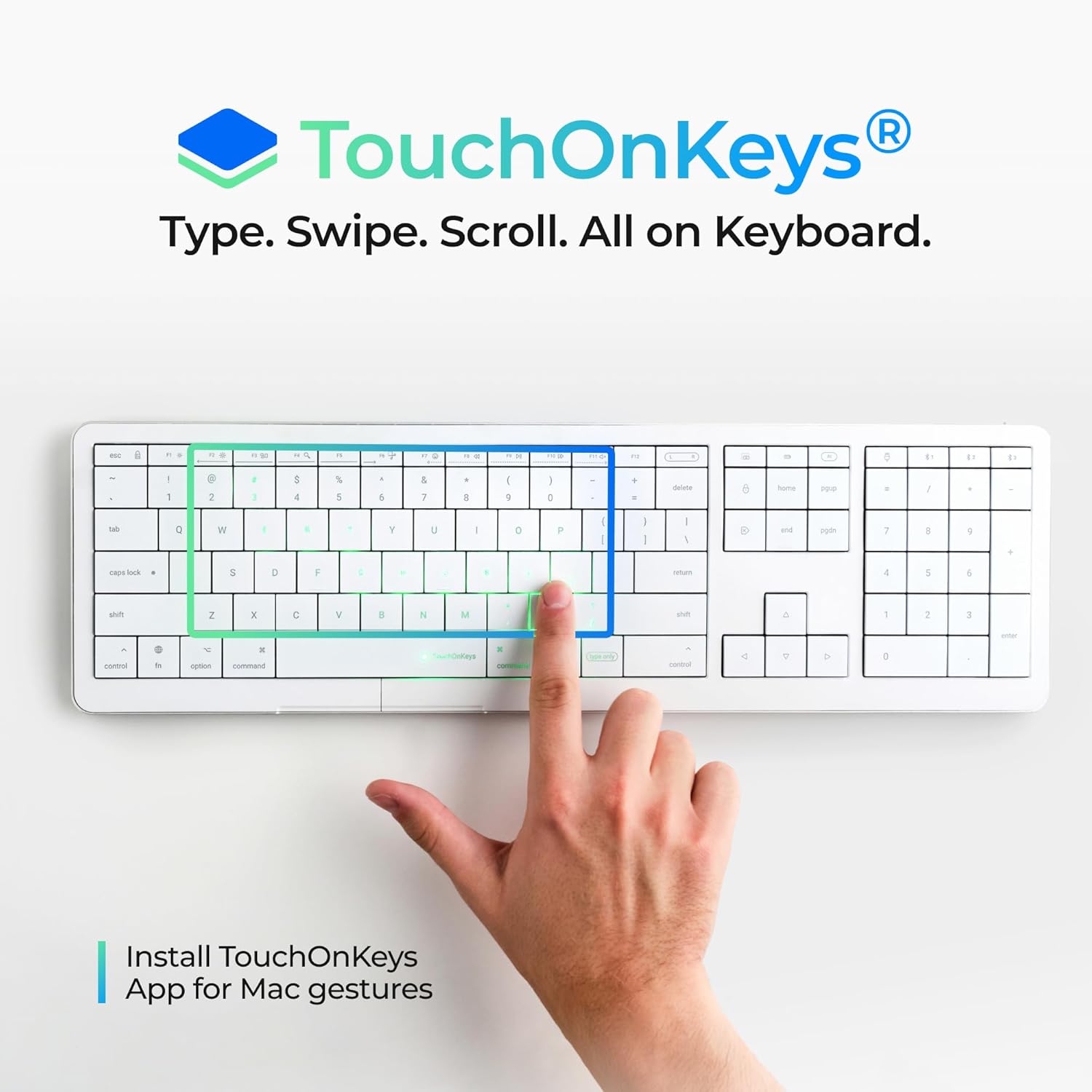
Intelligent Productivity TouchOnKeys Technology Type and touch on one surface
Built with an integrated touch surface, the keyboard lets you swipe, scroll, and navigate without lifting a hand.
*MacOS requires TouchOnKeys App for native trackpad gestures.
The video showcases the product in use.The video guides you through product setup.The video compares multiple products.The video shows the product being unpacked. 0301 video for gallery Merchant Video
Adaptive Intelligence AI recognizes when you’re typing or touching
Adaptive Intelligence (AI) filters out accidental input. AI recognizes your hands separately — so you can gesture with one hand while the other rests. When a gesture starts, AI prevents accidental keypresses. You could adjust AI sensitivity, or train your keyboard in the App.
The video showcases the product in use.The video guides you through product setup.The video compares multiple products.The video shows the product being unpacked. 02-92 video gallery Merchant Video
Designed for Mac Great Typing. Native Mac Trackpad
Low-profile scissor switches engineered for precise, quiet typing. Full set of trackpad gestures for Mac*, iPad, AppleTV and Vision Pro. Special smooth keys coating makes every move effortless.
*Mac requiers TouchOnKeys App.
The video showcases the product in use.The video guides you through product setup.The video compares multiple products.The video shows the product being unpacked. 0303 video gallery Merchant Video
Interactive RGB Backlit Your Light. Your Rules.
Instant backlit response for touch and gestures. Per-key RGB visualizes movement with a dynamic light trail. Customize your style with 16 million colors.
The video showcases the product in use.The video guides you through product setup.The video compares multiple products.The video shows the product being unpacked. 03-04 vedeo gallery Merchant Video
Space. Focus. Cense. Simple things work better
One device means fewer distractions. CLVX1 keeps your hands in place so you stay focused longer, think clearer, and maintain a steady productive rhythm
The video showcases the product in use.The video guides you through product setup.The video compares multiple products.The video shows the product being unpacked. Space and Sense Merchant Video


 Code
Code
Type, navigate, and run commands without hand-lifting — stay in flow through long coding sessions.
 Browse
Scroll, swipe, and switch tabs directly on keys for faster, smoother web navigation.
 Navigate
Navigate your PC, tablet, phone, TV, or VR — all from one surface, no hand-lifting needed.
 Create
Customize gestures and sliders to shape your flow — work faster, smoother, and with ease.
Aesthetic and Ergonomic Design


Does it switch between typing and touch automatically?
Yes. TouchOnKeys technology merges a keyboard and precision trackpad into one seamless surface.
Adaptive Intelligence then understands your intent — switching between typing and gestures instantly and naturally, with no buttons or toggles needed.
What about false gestures? Can they interrupt my work?
No. Adaptive Intelligence recognizes your intent in real time, filtering out unintentional touches.
You also could customize AI sensitivity or even train the keyboard to know your patterns with the App.
Do I need to install anything to use it?
Yes. To unlock the full Mac gesture experience, install the TouchOnKeys App.
It enables advanced gestures, customization, and personalization options for your workflow.
Will gestures feel the same as on a MacBook trackpad?
Yes — and more. You can also customize gestures, Touch Sliders, F-row actions, and backlight profiles through the TouchOnKeys App
Can CLVX 1 replace my mouse for creative work?
Nope. But, it enhances your keyboard-and-mouse setup with customizable on-keys gestures and touch sliders. Powering your keyboard hand with an extra layer of control.
PERFECT IDEA FOR A CHRISTMAS GIFT AND STOCKING STUFFER. An ideal pick for tech lovers, creators, and anyone who enjoys smarter, sleeker typing.
TYPE, SWIPE, SCROLL — ALL ON KEYBOARD. Experience seamless, zero-hand-movement control on Mac.
GREAT TYPING. Low-profile scissor switches engineered for precise, quiet typing. Standard 19mm keys pitch makes zero-lattice layout familiar and easy to use.
NATIVE MAC TRACKPAD. Full set of trackpad gestures for Mac*, iPad, AppleTV and Vision Pro. Special smooth keys coating makes every move effortless. *Mac requiers TouchOnKeys App.
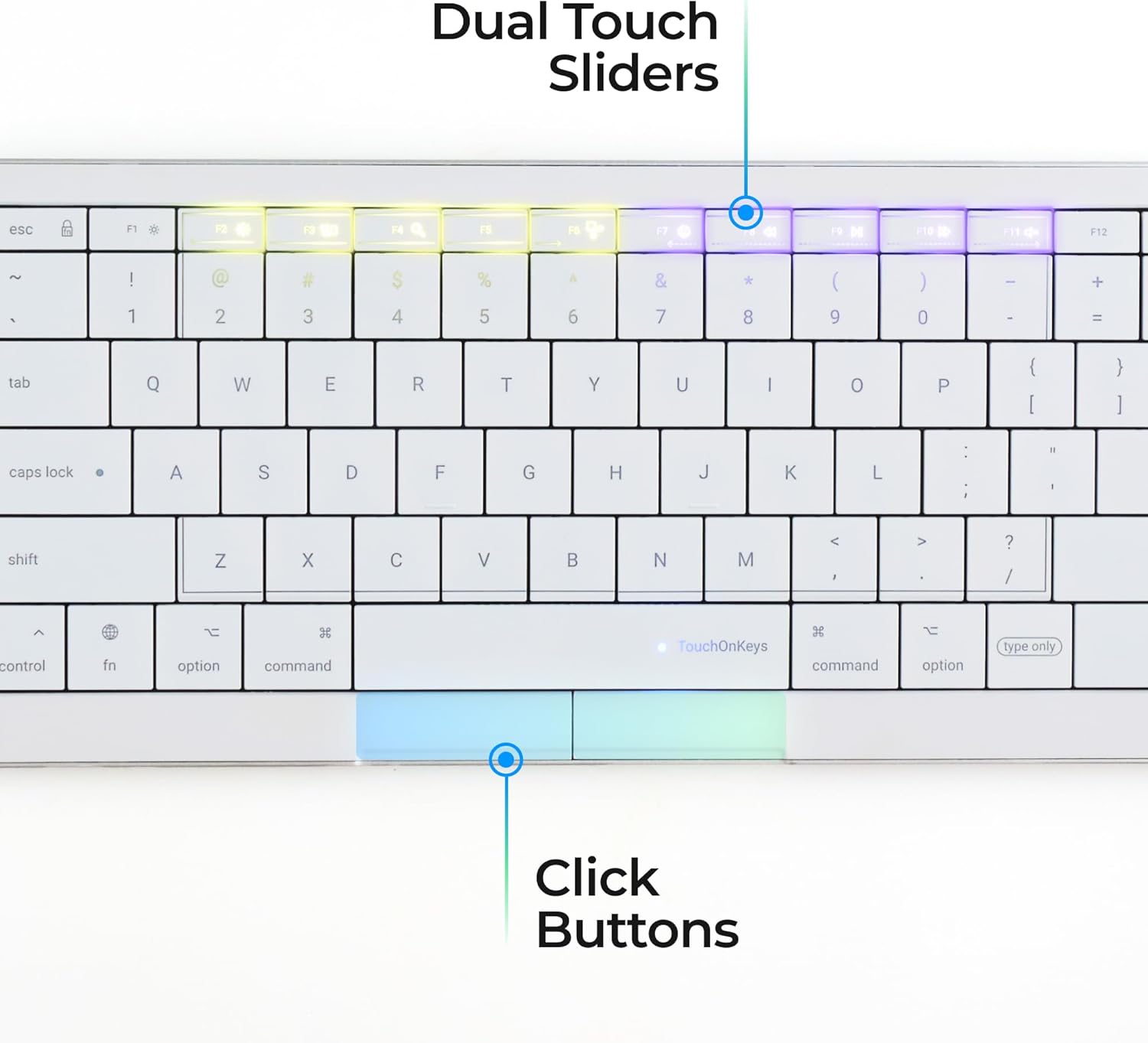
PROGRAMMABLE TOUCH SLIDERS AND GESTURES. Enhance your keyboard-and-mouse setup with customizable on-key gestures and touch sliders. Ready to use presets for Adobe Photoshop, Premier, Illustrator, Figma, Mira, Chrome, Safari and more.
POWERED BY ADAPTIVE INTELLIGENCE (AI). AI recognizes when you’re typing or touching, filtering out accidental input. AI recognizes your hands separately — so you can gesture with one hand while the other rests. When a gesture starts, AI prevents accidental keypresses. You also could adjust AI sensitivity, or train your keyboard in the App.
MULTI-DEVICE CONNECTIVITY. 3x Bluetooth channells and USB-C. Mac*/iPad/AppleTV/Vision Pro/Windows. *Mac requiers TouchOnKeys App.
INTERACTIVE RGB BACKLIT: Customize your gesture-responsive RGB backlight with 16.5 million colors with the App.
TOUCHONKEYS APP. Setup backlit effects, add content-aware profiles, customise gestures and touch sliders, update firmware, and chat with support.
BATTERY LIFE. Up to 40 hours of uninterrupted work (without backlight) — around 1.5 weeks of normal usage. Up to 12 hours with per-key RGB backlight on.
8 reviews for 1 Mac | Touch On Keys & Gestures AI Keyboard | Bluetooth & USB-C | Low Profile Silent Scissor Keys | Interactive RGB | Aluminum Chassis | Compatible with Mac/iPad/AppleTV/VisionPro
Add a review

$199.00
trumpler –
Game changer !
I’m genuinely amazed at how useful this keyboard is. It’s not just good—it’s special. When I first read about its features, I was skeptical. I thought, “There’s no way you can move the cursor without accidentally pressing a key, or type an email without unintentionally shifting the cursor.” I’m not the proficient typing. so I expected to make those mistakes. But after two full days of use—I haven’t made a single one. The sensors are that accurate.It does take a little getting used to, especially if you’re used to a smooth surface touchpad. But after a full day, I barely noticed the transition. Moving along the keys feels natural and effortless.Some feature I like :• The sliding controls for keyboard lighting and volume—intuitive and sleek.• The dedicated calculator key (huge win for me as an inventory manager).• The ability to disable the touchpad during long emails—perfect for preventing accidental typos and adding peace of mind.This isn’t one of those gimmicky keyboards that promise innovation but delivers nothing. Every feature here is thoughtfully designed and genuinely useful. If you’re looking for an all-in-one keyboard that is precise, convenient and a smart design—I highly recommend
Surfer Bob –
Very unique and works exactly as described
I purchased this keyboard to control a computer connected to my TV where using a mouse would be inconvenient. I was really surprised how well this works without much of a learning curve. The touchpad portion works extremely well and the keyboard is very high quality. It is expensive but I think it was worth the asking price. I would buy another one if it cost less.
Doron M Johnson –
Nice Mix of Tech and Comfort
I type most of the day and this feels great. Gestures took a bit to learn, but now I use them without even thinking. It’s solid, quiet, and looks great next to my monitor.
Amazon Customer –
Works well but keys themselves are horrible
The TouchOnKeys feature of this keyboard is a HUGE efficiency improvement to my daily workflow. I love it.However the biggest cons for me are the keys themselves. They could have been made with a small indentation in each key that would aid in feeling the individual keys for us touch typers. It has taken me awhile to get used to the feel, and I’m still not quite there.The second thing is how badly they show finger oils. My guess is the specific plastic or finish of the plastic is necessary to allow the keys to function as a touchpad, but I’ve used other keyboards with dark keys that didn’t show oils this bad. I am cleaning the keys off constantly, which can’t be good in the long term. We’ll see how they hold up I guess.Maybe they can make some improvements on the key material and typing feel for the small version that is pending. It would also be nice if they could include an integrated number pad in the smaller version that makes use of the 7-8-9, U-I-O, and J-K-L keys, like older laptops used to. As a number pad user, I’m stuck with the long version.
David –
Cool idea, few issues, big price tag
Overall, I like the idea and I think the execution is almost there, but I do have a few grievances. Let me get some of these out of the way first.I think the touchpad area should have a physical outline or border to be able tell where the area ends. I often times would find myself trying to move my cursor outside of the boundary and would have to look down at the keyboard.Another problem I ran into is regarding the initial input response. This can be super problematic when trying to move the mouse cursor over small, incremental, and precise areas like trying to resize a window or a pane. Not really sure how that can be fixed but it can be annoying when trying to move the cursor over small spaces.I also find myself sometimes accidentally moving the mouse cursor when I hover my fingers over the keys to type. This is really moreso from habit, but I’d imagine doing so would common thing for a lot of people who type regularly.I know it seems like I have a lot of bad things to say about this keyboard, but overall I like being able to have this at my desk without needing a mouse AND being able to have touchoad gestures. To me, the gestures was one of my most desired features since I often times switch virtual desktops and using gestures feel much more natural this using a keyboard shortcut. However, I feel as if I’d only recommend this keyboard if you have extra money to spend and you’re not already eyeing something like a mechanical keyboard considering how pricey it is.Edit: In the original review, I forgot to mention two nice little features I think someone interested in this might want to know about. This keyboard does have a dedicated key to disable the touchpad while typing so you don’t run into the issue mentioned above (I just often times forget to press it). It also has a pair of dedicated left and right mouse buttons if you prefer to use those instead of touch to click on the touchpad. It’s probably also worth mentioning that the keyboard worked for me OOTB on Linux without need any other additional software or drivers.
Karen Larson –
Fantastic product!
So far so good. It connects instantly every time, no lag or connection issues…even from across the room. Its compact size makes it easy to carry around and tuck away when not in use.
Kris Vandenberg –
Space Saver for Hybrid Setups
I switch between my MacBook and a Windows laptop. This connects to both in seconds and saves me from dragging two keyboards around. Perfect if you work in different places.
bret frelow –
love it
This has to be the nicest keyboard I’ve ever used, and I’ve used a lot of keyboards. Once you get used to the features, you’ll love it too.